Account Ownership · Building Internet · Scoped Access for Supers and Boards · Keep-or-Replace Advice After the 2026 FCC Order
When the Hik-Connect app stops showing a Manhattan building’s cameras, the camera is rarely the thing that broke. The recorder is tied to an account nobody can reach because the installer or the old managing agent registered it; it sits behind building internet that a new bulk provider re-wired last month; or the super, the overnight doorman, the board treasurer and a store manager all share one password that someone changed. We sort out who owns the device, get it talking to Hikvision’s service again through the network it actually lives on, give each person the access they should have, and tell you plainly whether the Hikvision hardware is still worth repairing now that new Hikvision equipment can no longer be imported or marketed in the U.S.
Reviewed and updated October 18, 2026, against Hikvision’s support documents, the FCC’s July 2026 order and Census housing tables · Anwar Timothy, NYS license #12000287431 · Manhattan visits are booked from East Fordham Road in the Bronx
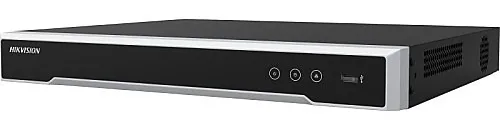
Manufacturer product photo, not an installed unit: a low black Hikvision network video recorder with silver trim along the front, three small buttons and a USB port. A box like this, usually tucked in a super’s office, package room or store back office, is what the Hik-Connect app is really talking to.
Manhattan Hik-Connect Repair Request
Tell us the building type, what the app shows and who set the system up — we call back the same business day
✅
Request Sent!
A technician will call you back about the Manhattan system the same business day.
25+
Years Experience
✓
Same-Day Estimates
100%
Licensed & Insured
4.7★
201 Google Reviews
Lobby went dark in the app the night a package disappeared? Text a screenshot of what Hik-Connect shows, a photo of the label on the recorder (it carries the serial number and, usually, the device verification code) and the name of whoever installed the system. Most Manhattan calls can be narrowed down to account, network or hardware before anyone rides an elevator. Call or text (929) 560-0737.
Diagnosis by phone costs nothing; on-site work is our standard service rate
We work through the super or managing agent, in common areas and equipment rooms — no apartment entry needed for most jobs
Two-hour arrival windows, seven days a week until 8 PM — NYS low-voltage license #12000287431
Why Manhattan Properties Need Hik-Connect App Support
Manhattan is a borough of shared buildings. The Census Bureau’s 2023 five-year survey counts 918,806 housing units in New York County, and 522,823 of them sit in buildings with fifty or more apartments; another 201,967 are in buildings of twenty to forty-nine units. Three households in four rent. Half the housing was built by 1951, and roughly 392,000 units predate 1940. That shapes every Hik-Connect problem we see. A camera system in a Manhattan building is almost never one person’s gadget: it was bought by a board or an owner, installed by a contractor who has since moved on, watched by a super and a front desk, and asked about by shareholders, tenants, store managers and, after an incident, the precinct. When the app stops working, the first question is not “what’s wrong with the camera?” but “whose system is this, and who is supposed to be able to see it?”
The second shaping fact is the network. A recorder in the basement of a pre-war co-op on West End Avenue might share a modem with the laundry card reader, sit on a line the managing agent pays for, or ride a bulk internet contract the building signed with a provider who re-cabled the risers last spring. Hikvision’s own support pages put the cause of most “I can no longer see my cameras on my phone” complaints in the same place: if the device was added by QR code or serial number, its Platform Access link to Hikvision’s service is offline, and the fix starts with the recorder’s network settings — its address, its gateway and its DNS servers. In a building where nobody on staff can log in to the router, that is not a five-minute fix. It is a coordination job between the super, the internet provider and whoever holds the recorder’s admin password.
Then there is who gets to look. Manhattan building lobbies are a known target: NBC New York reported in March 2018 that police were looking for a man in a Fresh Direct coat who had taken packages from the lobbies of at least three Upper West Side buildings, identified from surveillance video the NYPD released, and the 19th Precinct on the Upper East Side has posted warnings about arrests for package theft from vestibules and lobbies. A management firm that advises New York co-ops and condos recommends that boards set a written policy for who may see footage, route requests through the property manager, keep a log of who viewed it, and hold recordings for 30 to 90 days. Hik-Connect can support all of that — separate shared accounts with only the permissions each person needs — but only if someone sets it up that way instead of handing one login to everyone.
The last fact is new this year. On June 26, 2026, the FCC released an order, published in the Federal Register on July 6 and effective July 16, that prohibits the continued importation and marketing of covered equipment added to its Covered List in 2024 or earlier — which includes Hikvision video surveillance equipment. The same order says it “does not affect the continued use or operation” of equipment people already own. For a Manhattan board with forty Hikvision cameras on the ceilings, that means the system is legal to keep, but replacement parts, spare recorders and warranty swaps will be harder to come by. Part of supporting Hik-Connect here is helping owners decide what to repair, what to retire, and in what order.
Manhattan facts that shape a Hik-Connect repair
918,806 housing units in New York County, median year built 1951, about 392,000 built in 1939 or earlier (Census ACS 2023, five-year).
522,823 units are in buildings of 50 or more apartments and 201,967 in buildings of 20–49 — most camera systems serve a whole building, not one household.
583,733 renter households against 191,643 owner households, so most residents who ask for camera access are not the system’s owner.
July 16, 2026: the FCC’s prohibition on importing and marketing previously authorized covered equipment, including Hikvision’s, took effect; continued use of equipment already owned is not prohibited.
October 24, 2023: Hikvision released Hik-Connect for Teams, adding multi-user accounts with predefined roles — before that, Hikvision’s product director said, companies had to share one login.
May 16, 2024: a city pilot invited businesses along 125th Street to share live camera feeds with the NYPD through a separate box, with the business owner keeping control.
Most Manhattan buildings that call us about Hik-Connect also ask about the lobby entry panel; if your intercom is due, our Manhattan intercom repair team works from the same visit.
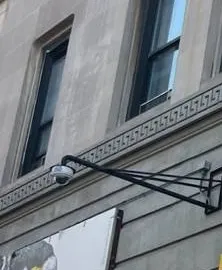
Real AESS job photo, cropped: a white dome camera on a black steel wall arm, mounted on a grey stone facade with a carved band course above. Exterior cameras on Manhattan facades often sit far from the recorder and the router, which is why a network change inside the building can take them off the app first.
Need Hik-Connect Repair in Manhattan? Same-Day Help
If the building’s cameras disappeared from the app this morning, call (929) 560-0737. We book the next open two-hour window and most systems are back in the app within one to two hours of our arrival, because the usual culprits — an address the router handed out again, a DNS server the new provider doesn’t like, Platform Access switched off by a firmware reset, a device bound to the wrong account — are fixed at the recorder, not on a ladder.
Five checks a super or store manager can make before we arrive. None of them needs a password you don’t already have, and each one tells us something.
Look at the recorder’s own screen. If the cameras show live on the monitor in the super’s office or back room, the cameras and cabling are fine and the problem is between the recorder and the internet.
Find the network cable. Follow the cable from the back of the recorder to the router or switch. Hikvision’s first step for an offline device is to confirm it is physically plugged into the network; in package rooms and basements it is often a cleaner or a mover who pulled it.
Note anything that changed. A new internet provider, a router swap, a power cut on the block, new management. Write down the date — it narrows the search.
Screenshot the app. The exact wording (offline, an error number, “added by another account”) points to different fixes.
Photograph the label. The sticker on the recorder carries the serial number and, on most models, the default device verification code. Don’t post it publicly; send it to us directly.
What the message on the screen usually points to
What you see
Where the fault usually is
Who needs to be there
Device shows offline in the app, live picture fine on the recorder’s monitor
The recorder’s link to Hikvision’s service: Platform Access disabled, wrong gateway or DNS, or an outbound path the firewall blocks
The super with access to the recorder and the router; sometimes the internet provider
An offline code such as 0x2002 under Platform Access
Troubleshooting guides describe it as the recorder’s peer-to-peer function not working, usually a network or firmware issue
Someone with the recorder’s admin password
“Added by another account” when you try to add the recorder
Ownership: the device is bound to someone else’s Hik-Connect account
The current account holder, or proof the building owns the equipment
App worked, then stopped after a new phone or a reinstall
The app is logged into a different account from the one the device is bound to
Whoever knows the original account email and can receive its codes
Device added by IP address stopped connecting
Hikvision USA notes these depend on the building’s address and open ports staying the same; a provider change breaks them
The person who controls the router
Black tiles on the recorder’s own monitor too
Not an app problem: camera, cable, power or recorder hardware
A technician on site
The table is a starting point, not a diagnosis. A building can have two of these at once — a provider change that broke the network path and, discovered while fixing it, a device bound to a former installer. That is why we ask for the screenshot, the label and the history together, and why the first call is free.
What We Install
Hik-Connect App Support Services in Manhattan
Each service below starts from the same principle: the recorder, the account and the network all have an owner, and the repair is not finished until those owners are written down. Here is what we do in Manhattan buildings, stores and offices.
Platform Access restored
We check the recorder’s Platform Access status, its IP address, gateway and DNS, and whether it can reach Hikvision’s registration servers on the building’s network. Hikvision’s own offline guide walks through exactly this order — enable, check the address, set DNS, try the alternate server, update firmware, then test the firewall — and we follow it with the router in hand.
Device ownership and transfer
When a recorder is bound to a former installer’s, agent’s or tenant’s account, we work through Hik-Connect’s transfer process or Hikvision’s documented reset routes so the building’s own account holds the device. Hik-Connect’s transfer feature sends a security code to the current owner’s registered phone or email, so we plan the hand-off with whoever still has that inbox.
Scoped access for staff and boards
Hik-Connect lets the owner share a device and choose permissions per person — live view, remote playback, two-way audio, PTZ. We set the super, the desk, the managing agent and a designated board member up with their own access, matched to the building’s footage policy, instead of one shared password.
Hik-Connect for Teams for multi-site owners
Retailers with several Manhattan locations and managing agents with several buildings can use Hik-Connect’s team mode, where a primary admin creates a multi-user account with predefined roles. We set up the sites, the roles and the notification rules so managers see their own stores only.
Firmware and vulnerability clean-up
Older Hikvision firmware carries known flaws; CISA listed CVE-2021-36260, a command injection flaw in some Hikvision products, in its catalog of actively exploited vulnerabilities in January 2022. We identify the model, load the correct firmware from Hikvision, close router port forwards that aren’t needed, and remove default and orphaned accounts.
Building network coordination
We meet the internet provider’s technician or the building’s IT contractor, reserve an address for the recorder, and document what the camera system needs from the network so the next router swap doesn’t take the lobby off the app again.
Keep-or-replace assessment
After the FCC’s 2026 order, we give boards a written list: which Hikvision devices are healthy and worth keeping, which have failing drives or obsolete firmware, and which to replace first with equipment from makers not on the Covered List, while the old recorder keeps its footage readable.
Installer platform hand-off
Systems installed by a dealer may sit in the installer’s Hik-ProConnect or Hik-Partner Pro portal, which Hikvision describes as a platform for installers to manage devices and hand sites over to the end user’s Hik-Connect account. We arrange that hand-over so the building owns its devices outright.
Recorder replacement when it’s hardware
If the recorder itself has failed — dead drive, boot loop, burned power supply — we replace it on the cameras you have, carry the account and sharing across, and keep the old drive readable for any footage still needed.
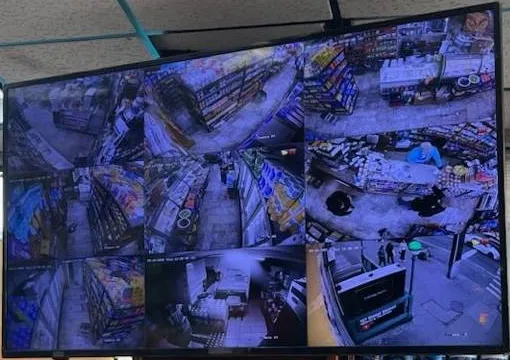
Real AESS job photo, cropped to the screen: a monitor hung from a drop ceiling shows a split-screen layout of a store’s camera views — shelving aisles, the counter and the street entrance. The same channels the shop sees on this screen are what its manager expects on the phone; when the screen works and the app doesn’t, the fault is on the network side.
Building Specialists
Hik-Connect App Support for Manhattan's Architecture
The same app error means different work in different Manhattan buildings, because the recorder lives in a different place, answers to a different person and reaches the internet a different way. These are the building types we see most.
Pre-war elevator co-ops
Upper West Side, Upper East Side, Morningside Heights, Washington Heights. The recorder is usually in the super’s office or a basement room near the boiler, fed by cable that climbs old dumbwaiter or service shafts. Access decisions belong to the board, the work is arranged through the managing agent, and the super is the one who actually uses the screen every day.
Doorman condos and rental towers
Post-war and new towers from Yorkville to Battery Park City. A front desk monitor, a package room, a garage and a staff entrance, often with a separate building IT contractor who manages a firewall the camera vendor has never seen. The desk needs live view, the resident manager needs playback, and nobody at the desk should be able to delete.
Pre-war walk-ups
Five- and six-storey buildings in Harlem, the East Village, Hell’s Kitchen and Inwood. One or two owners, a part-time super, a recorder in a hallway closet or a cellar, and an internet line that is often the owner’s own residential account. Here Hik-Connect is usually on the owner’s phone and the trouble starts when the owner’s line or phone changes.
Cast-iron and loft buildings
SoHo, Tribeca and NoHo, where a district of roughly 26 blocks and nearly 500 buildings was designated in 1973. Ground-floor retail, loft co-ops above, and very thick masonry party walls that wireless cameras struggle to see through. Exterior work on a landmarked front needs Landmarks Preservation Commission rules in mind, even when the repair is “only” a camera swap.
Office-to-residential conversions
Lower Manhattan and Midtown East, where the City Comptroller counted 44 conversions holding about 17,400 apartments. New lobbies, new package rooms and new cameras — but frequently the developer’s installer still holds the Hik-Connect account months after the residents move in.
Ground-floor stores and restaurants
Delis on Broadway, boutiques on Madison, restaurants on Ninth Avenue. The recorder sits in a back office on the store’s own business internet; the owner watches from home and the manager from the floor. A point-of-sale vendor or a new router from the provider is the most common reason the app goes dark.
Method, building by building
Co-ops. We start with the managing agent, not the recorder. Before the visit we ask for the name on the original installation invoice, the email address the board thinks the Hik-Connect account uses, and the building’s footage policy if there is one. On site we confirm whose account the device is bound to from the recorder itself, fix the network side, then move ownership to an address the building controls — a role mailbox such as one held by the managing agent, not a board member’s personal Gmail that leaves with them at the next election. Shares go to the super, the agent and one designated board contact, with permissions matched to the policy.
Doorman buildings with their own IT. Here the recorder often sits on a segmented network behind a business firewall that blocks outbound connections by default. Hikvision’s offline guide tells technicians to test whether the device can reach its registration server on specific ports; in a managed network that test has to be done with the IT contractor, who then opens only what the recorder needs. We bring the list of what to allow, rather than asking for the recorder to be put on the open internet.
Walk-ups. The usual fault is simpler and more personal: the owner switched providers, got a new router, or bought a new phone and logged into the wrong account. We reserve a fixed address for the recorder on the new router so it keeps its place, re-check DNS, and move the account to an email the owner will still have in five years. For two-owner buildings we set up sharing so the second owner is not dependent on the first one’s phone.
Lofts and landmarked fronts. When a Wi-Fi camera drops out behind brick or cast iron, the cure is usually a cable, not a stronger router. Where the camera is on a designated facade, we work within the Landmarks Preservation Commission’s staff-level criteria for security cameras — discreet placement, attachment into mortar joints rather than decorative surfaces, minimal painted conduit — and keep any new run inside the building wherever we can.
Conversions and new buildings. We get the developer, the property manager and the installer on one call. Hik-Connect’s transfer and the installer portal’s hand-over feature both exist for exactly this situation; the work is in getting the right people to approve it before the warranty contact disappears.
Buildings sorting out camera ownership often find the door entry has the same problem; the Manhattan apartment building camera page covers camera layout for lobbies, package rooms and stairwells.
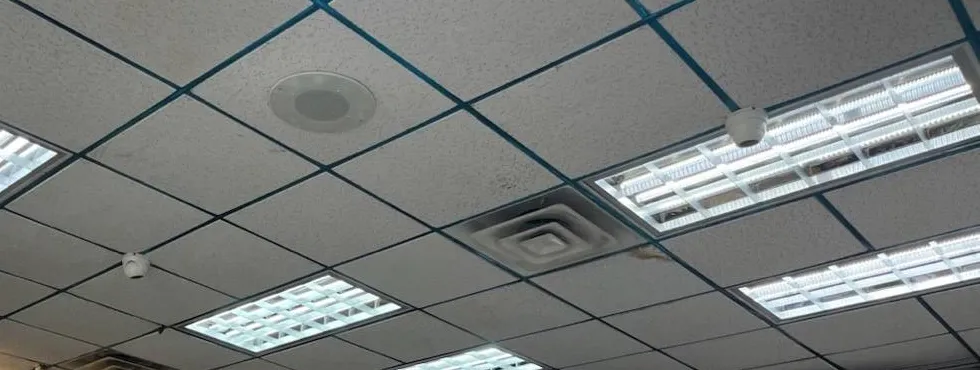
Real AESS job photo, cropped to the ceiling: two small white mini dome cameras set in a drop-ceiling grid between fluorescent light panels, a round ceiling speaker and a square air vent. Cameras in a store ceiling like this feed a recorder in the back office, and that recorder is what Hik-Connect connects to.
Commercial Hik-Connect App Support
Business Hik-Connect App Support in Manhattan
For a Manhattan business the app is how the owner sees the store from somewhere else, and how a manager pulls the clip the police ask for. These are the corridors where we do that work, and what businesses there usually need.
125th Street, Harlem
Hardware stores and small shops along a business improvement district that in May 2024 was invited into the city’s pilot for sharing live camera feeds with the NYPD. Owners here want Hik-Connect for themselves and a clear line between what they choose to share and what stays private.
Broadway, Upper Manhattan
Delis, pharmacies and phone shops from the West 90s up through Washington Heights and Inwood, many open late. One owner, sometimes two or three locations, a manager per shift. Hik-Connect for Teams fits the multi-store owner; plain sharing fits the single store.
Midtown East and Grand Central
Office floors around the 2017 Greater East Midtown rezoning that produced One Vanderbilt. Tenants in older Class B buildings often have a Hikvision recorder in a suite closet, on the landlord’s or the tenant’s own network, and an office manager who needs the app working before the morning.
SoHo and Tribeca retail
Ground-floor boutiques and galleries in cast-iron buildings, with loft offices above. Thick masonry, Wi-Fi cameras that struggled from the day they were installed, and leases that limit what can go on the front of the building.
Financial District conversions
Former office towers now housing apartments, including the 1,320-unit conversion at 25 Water Street. New lobby and amenity cameras, a property management firm, residents arriving in waves, and a developer’s installer who still holds the account.
Upper East Side lobbies and medical suites
Doctors’ offices on the ground floors of residential buildings and doorman lobbies where package theft is a recurring precinct warning. Two different owners — the practice and the building — often have two different systems in the same lobby, and both are on Hik-Connect.
Rules Manhattan businesses and buildings should keep in view
No cameras where staff change. New York Labor Law section 203-c bars employers from video recording employees in restrooms, locker rooms and rooms designated for changing clothes. That applies to boards as employers of building staff, and to every store and office.
Audio is different from video. Recording a conversation without the consent of at least one party is eavesdropping under Penal Law section 250.05, a class E felony. Many Hikvision cameras have microphones; we turn audio recording off unless the owner has a lawful reason and posted notice.
Landmarked fronts. Exterior cameras on designated buildings and in historic districts follow the Landmarks Preservation Commission’s criteria, which allow staff-level approval for discreet, well-spaced cameras attached at mortar joints or plain masonry.
Small-business security credit. The New York State Commercial Security Tax Credit, for businesses with 50 or fewer employees, can return up to $3,000 per retail location on spending that includes surveillance cameras; the certificate application is due by October 31 each year.
Sharing with police is voluntary. In the 2024 pilot, the box that shares feeds is installed alongside the existing cameras and stays under the business owner’s control. Your Hik-Connect sharing settings are a separate decision.
Federal equipment rules. Since July 16, 2026, covered Hikvision equipment can’t be newly imported or marketed in the U.S.; equipment already in use may keep operating. Stores planning expansion should price additional cameras accordingly.
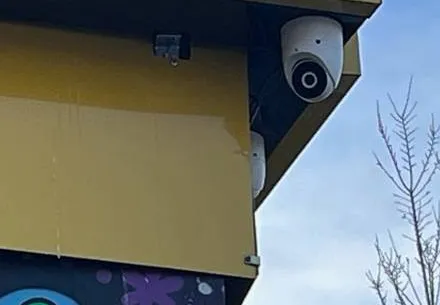
Real AESS job photo, cropped below the sign lettering: a white turret camera fixed under the corner of a yellow storefront fascia, with a second white camera partly visible beneath it and bare tree branches to the right. Storefront cameras like these record to a recorder inside the shop; the owner’s app view depends on the shop’s own internet line.
Your Questions Answered
Hik-Connect App Support in Manhattan: Questions Answered
These are the questions boards, managing agents, supers, building owners and shopkeepers in Manhattan actually put to us about Hik-Connect. They are grouped by the part of the problem they touch, and each answer is written for this borough’s buildings and the rules that apply here.
Accounts, Ownership and the People Who Left
The installer registered our building’s recorder to his own email — how do we get it back?
This is the most common Manhattan call we get, and there are three routes, in order of preference. The cleanest is a voluntary transfer: Hik-Connect has a Transfer Device feature that moves a device, with all its configuration and permissions, to another account. The current owner starts it, receives a security code on the phone number or email registered to his account, enters the target account and then the device verification code. If the installer is reachable and cooperative, that takes ten minutes and nothing on the recorder changes.
If the installer used Hik-ProConnect or Hik-Partner Pro, Hikvision’s installer platforms, the device may be sitting in his company portal rather than a personal account. Those platforms have a hand-over process to move sites to the end user’s Hik-Connect account; we ask the installer’s office to run it. If neither person nor company can be reached, we work from the recorder side, using Hikvision’s documented reset and unbind routes with someone who has physical access and proof the building owns the equipment. That route takes longer and may need Hikvision support, so we start it only after the first two have failed.
Our managing agent changed — how do we make sure the old firm’s phones no longer see the lobby?
Assume they can until you have checked. In Hik-Connect, access comes in two forms: the account the device is bound to, and every account the owner shared it with. If the old firm owned the device, transfer it first; if it was only shared with them, the owner removes the share. Then look at the recorder itself, because some installers also created local user accounts or left router port forwards so staff could connect by IP address, which bypasses Hik-Connect entirely.
On a hand-over visit we list every account on the recorder, every share in the app and every open port on the router, remove what does not belong to a current person or role, and change the admin password. The board gets a one-page list of who can see what, so the next agent change is a ten-minute job rather than an investigation.
A shareholder wants app access to the hallway camera outside her door — what can the board safely give?
Technically, Hik-Connect can share a single camera with live view only, and nothing else. Whether the board should is a policy question. A management firm that advises New York co-ops recommends that residents not get access to footage without board and legal approval, and a Brick Underground piece quoting New York property managers describes requests usually being approved only case by case. A camera pointed at one apartment door also shows every neighbor who passes it.
If the board approves, we can share that one channel with the shareholder’s account, live view only, no playback, no audio, and log the decision. If it doesn’t, a common compromise is a video doorbell or peephole camera the resident owns, inside the rules the building already has for those devices. Either way the building’s system stays the building’s.
Can the overnight doorman see live video without being able to export or delete clips?
Yes, and that is the right default for a desk. When the owner shares a device in Hik-Connect, permissions are chosen per recipient: live view, remote playback, two-way audio and PTZ control are separate checkboxes. The desk account gets live view of the lobby, vestibule, package room and service entrance; playback and export stay with the resident manager and the super.
At the recorder we do the same for the desk monitor: a local operator account that can switch layouts but can’t change settings or delete. Shift changes are then a matter of who is sitting there, not which password they know.
Building Internet, Wi-Fi and the Network in Between
Management switched the building to a new bulk internet provider and every camera went grey in the app — what changed?
Almost certainly the recorder’s address and route to the internet. A new provider usually means a new router or gateway, a different address range and different DNS servers. A recorder set to a fixed address from the old network now points at a gateway that no longer exists; a recorder on automatic addressing may have picked up an address but be using DNS servers that can’t resolve Hikvision’s registration server. Hikvision USA’s own steps for this are to confirm the cable, confirm Platform Access is enabled, cycle DHCP to see whether the address changes, and, if it does, set the preferred and alternate DNS to 8.8.8.8 and 8.8.4.4.
In a building, there is one more layer: the new provider’s equipment may sit in a telecom room the super can’t open, with the camera network on a port the installer configured without telling anyone. We arrange to be there with the provider’s technician or the building’s IT contractor, give the recorder a reserved address, and write down which port it lives on.
Does a recorder in the super’s basement office need its own internet line, or can it share the building’s?
It can share, and in most buildings it should, as long as it shares sensibly. Hik-Connect’s peer-to-peer design means the recorder makes an outbound connection to Hikvision’s service; it does not need a public address of its own or open inbound ports. What it does need is a stable local address, working DNS, and an outbound path the firewall allows.
What we avoid is putting the recorder on the same flat network as residents’ Wi-Fi or the laundry machines. On a building network we place it on its own segment or VLAN where the equipment allows, so a problem elsewhere doesn’t take the cameras with it, and a compromised device elsewhere can’t reach the recorder.
Why does a Wi-Fi camera that worked in the showroom drop out once it’s mounted in our pre-war apartment?
Because a pre-war Manhattan apartment is a series of masonry and plaster walls, often with metal lath, and the router is usually at the far end from the door the camera watches. Residents describe it themselves: a poster on r/NYCapartments wrote about “ongoing WiFi issues” in a pre-war railroad-style two bedroom. A Wi-Fi camera that streams video needs a much steadier signal than a phone checking email.
The fixes, in order of reliability: run a network cable to the camera and power it over that cable; add a wired access point near the camera; or move the camera to where the signal holds. Hikvision’s Wi-Fi dome cameras have external antennas, which helps, but they can’t see through a bearing wall.
Do we need to open ports on the router for Hik-Connect to work?
No. That is one of Hik-Connect’s main selling points: Hikvision describes the platform as peer-to-peer based, removing the need for centralised servers on site. A device added to the app by QR code or serial number reaches you through Hikvision’s service without inbound port forwarding. Hikvision USA notes that devices added to the app by IP address instead are a different case — those depend on the address staying the same and the ports staying open.
In Manhattan we find many recorders with both: added to Hik-Connect, and also forwarded through the router so the original installer could reach them. The forwarded ports are the exposure, not the app. We close what isn’t needed.
Hikvision, the FCC and Whether to Keep What You Have
Is it still legal to keep using our Hikvision cameras in Manhattan after the 2026 FCC order?
Yes. The FCC order published in the Federal Register on July 6, 2026, prohibits the continued importation and marketing of covered equipment added to the Covered List in 2024 or earlier, and Hikvision video surveillance equipment is on that list. The order states that it “does not affect the continued use or operation of previously authorized covered equipment; consumers may continue to use any device or equipment that they currently possess, if the equipment was legally purchased and maintains an existing equipment authorization.”
Separately, federal rules since 2022 have prohibited new FCC equipment authorizations for Hikvision telecommunications and video surveillance equipment. Neither rule orders a co-op, store or homeowner to remove anything. Government contractors and some institutions have their own procurement restrictions; if your building or business has such a contract, check it, but for an ordinary Manhattan owner the question is practical, not legal.
Can we still get replacement Hikvision cameras and recorders for a repair?
Less and less. The FCC considered requests to exempt spare parts, updates and replacements for existing devices and rejected them, writing that allowing imports and marketing of replacements “would defeat the entire purpose of this prohibition.” It also declined longer transition periods for existing inventory. Hikvision told its U.S. partners, in an April 2026 letter during the comment period, that limits on importation could affect access to replacement parts, warranty service and technical support.
In practice, that means a failed Hikvision camera is now often replaced with a camera from another maker that the recorder still accepts, and a failed Hikvision recorder with one from another maker altogether. We check compatibility before recommending either, and we say so in writing when a repair would depend on a part we can’t source.
Does the FCC order say anything about whether the Hik-Connect app keeps working?
Not in the passages we have read. The order addresses the importation and marketing of equipment, and it explicitly leaves existing equipment in use. The Hik-Connect app was still listed on Google Play in October 2026 as a free app for DVRs, NVRs, cameras, video intercoms and security control panels. We have found no published Hikvision statement ending the service for U.S. users, and we won’t predict one.
What we do recommend is not depending on any single cloud path for something a building relies on. A recorder that records locally keeps recording if the app is unreachable; a second remote-access method the building controls, such as a VPN to the recorder, keeps the super able to check in. We set that up where the board wants it.
The board wants to replace everything with another brand — what happens to the footage on the old Hikvision recorder?
It stays on the old recorder’s hard drive, and the old recorder can still play it back after the cameras move. We usually leave the old unit powered on a shelf, off the internet, for as long as the building’s retention policy says footage must be kept — the management firm we cite above suggests 30 to 90 days — and export anything flagged for an incident or a claim before it is retired.
If your attorney has asked for footage to be preserved for litigation, tell us before the changeover; we export those clips first and leave the drive untouched until counsel releases it.
Security, Firmware and Where the Data Goes
How do we know whether our recorder’s firmware has the 2021 flaw CISA warned about?
CVE-2021-36260 is a command injection vulnerability in the web server of some Hikvision products. CISA issued an alert in September 2021 encouraging users to review Hikvision’s security advisory and apply the latest firmware, and added the flaw to its Known Exploited Vulnerabilities catalog on January 10, 2022. Whether your device is affected depends on its exact model and firmware version, which are on the recorder’s information screen and on Hikvision’s advisory.
We read the model and version from the device, compare them with the advisory, and load the correct firmware from Hikvision for that model. Loading the wrong file can brick a recorder, which is one reason we don’t recommend downloading firmware from forum links.
Is it safer to view cameras through Hik-Connect or through a VPN back to the building?
Both are reasonable; what isn’t is port-forwarding the recorder’s web interface to the open internet. Hik-Connect goes through Hikvision’s service, which is convenient for supers and owners who just want the app. A VPN to the building’s own router keeps the traffic inside a connection the building controls, which some boards and IT contractors prefer, but it means someone has to manage the VPN accounts.
For most co-ops we set up Hik-Connect for daily use and leave the VPN as a fallback for the managing agent. For offices with their own IT, we follow whatever remote-access policy the firm already has.
Where does Hik-Connect actually keep our account information?
Hik-Connect’s privacy policy says Hikvision generally stores personal information on Hikvision-operated servers hosted with third-party infrastructure providers including Amazon Web Services, and lists data centers in the United States, Singapore, Brazil and Ireland. It also says video sent through its stream servers is not stored, and video stored with its cloud storage service is encrypted.
Video recorded by your recorder stays on your recorder’s hard drive unless you turn on a cloud service. If the board’s concern is where footage lives, the answer is in the basement, not in an app.
Stores, Offices and Several Locations
We run three shops below 96th Street — can one owner see all three without sharing a password with each manager?
Yes. That is what Hik-Connect for Teams was built for. Hikvision’s product director said in the October 2023 release that Hik-Connect accounts previously allowed only one login that companies had to share; the team version lets a primary admin create a multi-user account with predefined roles and add the whole team. The owner sees every site; each manager sees only the store they run.
We set up the sites, add each recorder, create the roles and decide with you who gets alerts at what hours. A manager who leaves is removed from one place.
Our store is on 125th Street and joined the NYPD camera-sharing pilot — does that change anything in Hik-Connect?
No. As reported by ABC7 when the pilot launched in May 2024, participating businesses connect a separate box, made by Fusus by Axon, that gives detectives at the local precinct real-time access to the cameras, and the way it works stays at the control of the business owner. Your Hik-Connect account, its shares and its permissions are a separate thing.
What we check is that the box and the recorder coexist on your network: the box needs a path to the recorder, and adding it shouldn’t change the recorder’s address. We document both so that a future router change doesn’t break either.
Will a clip sent from the app hold up for an insurance claim, or do we need the original from the recorder?
Ask the insurer or the detective what they want, but expect to need the recorder export. Phone apps commonly show a lower-resolution stream to save data, and a screen recording of the app loses the time stamp detail and file information an investigator looks for. An export straight from the recorder, to a USB drive, keeps the camera’s full recording.
We show the manager how to export from the recorder in under five minutes, and set the app so it can pull a clip quickly for a first look.
Arranging the Visit
What does the super need to have ready before your technician arrives?
Four things: access to the room where the recorder is, access to the router or telecom room (or the name of whoever has the key), the recorder’s admin password if anyone knows it, and the phone of the person who should own the Hik-Connect account at the end. If the account will belong to the managing agent, someone from the agent’s office should be reachable by phone.
If the building needs a certificate of insurance before contractors enter, send us the agent’s requirements with the booking and we send the certificate ahead of the visit.
Can you do the work without going into any apartment?
Almost always. Hik-Connect repairs happen at the recorder, the network equipment and the phones of the people who use the app. Those are in the super’s office, the package room, a basement equipment room or a store’s back office. The exception is a resident’s own camera, or a cable fault that runs through a unit, and we say so before we book.
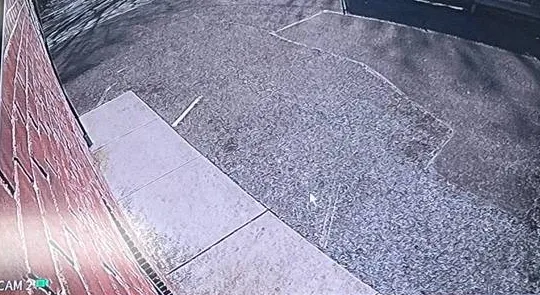
Real AESS job photo, cropped to one tile of a recorder’s monitor: a wide-angle view of a red brick wall, a strip of concrete sidewalk and a paved lot. Checking the picture on the recorder’s own screen first tells us whether a missing image in the app is a camera fault or a connection fault.
Equipment
Types of Hik-Connect Equipment We Install
Hik-Connect is an app and a cloud service; it works with the Hikvision devices below. We repair, re-register and configure all of them, and where hardware has to change, we install it.
Network video recorders (NVRs)
The box most Manhattan buildings and stores have, recording IP cameras over network cable. Its Platform Access setting is the link to Hik-Connect, and its hard drive holds the footage.
Turbo HD DVRs
Hikvision’s recorders for cameras on coaxial cable, common in older co-ops and walk-ups where the original analog cabling was kept. They connect to Hik-Connect the same way an NVR does.
Wi-Fi cameras
Single cameras added straight to the app, usually in apartments and small shops. Convenient, and the first to drop out behind Manhattan masonry; we often convert them to a wired connection.
Video intercom door stations
Hikvision’s intercoms can appear in Hik-Connect alongside the cameras, and Hikvision lists intercom management among the Teams features. We set call routing so the right phones ring.
Access control and attendance
Door readers and time clocks that Hik-Connect for Teams can manage. Common in small offices and restaurants that wanted one app for doors, staff hours and cameras.
Replacement equipment from other makers
Where a Hikvision device has failed and a like-for-like part isn’t available, we install recorders and cameras from makers not named on the FCC Covered List, such as Ubiquiti or Axis, and move the building to that maker’s app in a planned way.
Ways to reach the cameras from outside the building
Method
How it connects
Where it suits Manhattan
Hik-Connect (device added by QR code or serial)
Recorder makes an outbound connection to Hikvision’s service; no inbound ports
Supers, owners and store managers who want an app that just works
Hik-Connect for Teams
Same service, with an organisation account, roles and multiple sites
Multi-store owners, managing agents with several buildings
Device added by IP address
App connects straight to the recorder’s address through forwarded ports
Rarely the right choice; breaks when the address changes and exposes the recorder
VPN to the building router
Phone or laptop joins the building network, then views locally
Boards or IT contractors who want traffic to stay on their own connection
Who fixes an existing Hikvision system: national brands compared
Owners sometimes ask whether to call ADT, Ring or SimpliSafe instead. Those companies sell and support their own equipment and apps; their offers are built around their own cameras, hubs and monitoring plans, not around repairing a Hikvision recorder that another contractor installed. If your goal is to replace the whole system with one of their ecosystems, that is a legitimate choice. If your goal is to keep the Hikvision cameras on the ceiling working and get the app back, you need someone who works on Hikvision recorders and Hik-Connect accounts.
Question
ADT / Ring / SimpliSafe
AESS
Works on your existing Hikvision recorder
Their offer is built around their own equipment
Yes — repair, re-register, reconfigure
Moves a Hik-Connect account to the building
Not their platform
Yes, through Hikvision’s transfer and hand-over routes
Monthly fee required
Their monitoring plans are optional or required depending on product
No monthly fee for app support; footage stays on your recorder
Licensed NYS low-voltage contractor on site
Varies by dealer
Yes, license #12000287431
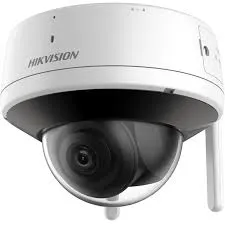
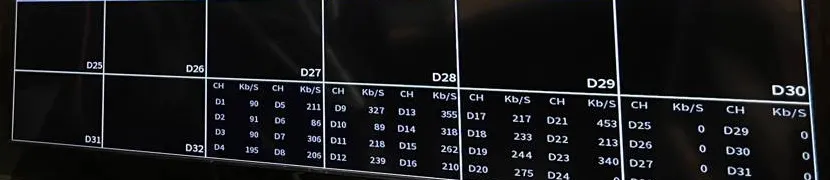
Manufacturer product photo, not an installed unit: a white Hikvision dome camera with a dark lens bubble and two short external antennas. Wi-Fi cameras like this connect to the app directly, so the strength of the apartment’s or store’s Wi-Fi where it is mounted decides whether it stays online.Real AESS job photo, cropped to the bottom of a recorder’s monitor: empty camera tiles above a table listing channels with their incoming data rate in kilobits per second, some channels showing zero. A table like this tells us which cameras the recorder is actually receiving before we look at the app.
AI Overview Reality Check
What AI Gets Wrong About Hik-Connect App Support in Manhattan
We could not capture Google’s AI Overview for these searches from our build environment, so this section works from the advice that keeps appearing in forum threads, troubleshooting blogs and the answers built from them. Each claim has some truth in it; each needs correcting for a Manhattan building.
“Ninety percent of Hik-Connect connection issues are DNS”
A reply in the r/Hikvision forum put it exactly that way: “90% of Hik-connect connection issues are DNS. 5% are firewall and the other 5% are user error.” Hikvision’s own documents agree that DNS matters: its offline guide suggests setting the DNS server to 8.8.8.8 or a reliable local one, and its U.S. support article tells owners to change preferred and alternate DNS when the address has changed.
In a Manhattan building, though, the bigger share of our calls involves the account, not the network: devices bound to someone who left, shared logins changed by one person, a new agent with no access. DNS is the first thing to check because it’s quick, not because it’s always the answer.
If the device shows “added by another account” or the app is logged in under a different email from the one the recorder is bound to, no DNS change will help. That needs a transfer or a reset, with the right people in the room.
“Just toggle Platform Access off and on and reboot”
Troubleshooting blogs give this as a first step for error 0x2002 and related offline codes, alongside enabling DHCP and changing DNS. It does sometimes work, because it forces the recorder to register again with Hikvision’s server.
It doesn’t work when the recorder can’t reach the server at all. Hikvision’s guide tells technicians to test that path, and to check whether a firewall blocks the connection to the registration server. In doorman buildings with a managed firewall, or offices with their own IT, that is often the real block.
Rebooting a building recorder also isn’t free: it stops recording for a few minutes. We prefer to diagnose first and reboot once, at a time the super chooses.
“Delete the app and reinstall it”
One Reddit user tried exactly that after a Hik-Connect update: “I tried deleting the app and installing it again. Lost all my settings but I set it up again. It worked but only until I left the app.” Reinstalling can clear a corrupted app, but it rarely touches the cause.
For a building, a reinstall has a hidden cost: if the person reinstalling doesn’t remember which email the device was registered under, they may log in to a new empty account and conclude the cameras are gone. We see this regularly with supers who inherited a phone from a predecessor.
Before anyone reinstalls, write down the account email and confirm you can receive codes at it. That one step prevents most of the “lost everything” calls.
“Hikvision is banned, so the cameras have to come out”
The FCC’s actions are real and have teeth: no new equipment authorizations since the 2022 rules, and since July 16, 2026, no continued importation or marketing of covered equipment added to the list in 2024 or earlier. Summaries online sometimes collapse this into “banned.”
But the FCC’s own order says the prohibition “does not affect the continued use or operation of previously authorized covered equipment.” A Manhattan co-op is not required to remove its cameras, and tearing out a working system can cost far more than maintaining it while planning a phased replacement.
What the rules do change is the parts supply. Plan for failures to be fixed with other makers’ equipment, and budget the replacement over several years rather than all at once.
“Unbinding a device is one button in the app”
Videos and posts about the “added by another account” message often show an Unbind button and make it look trivial. Sometimes it is — when you are standing at the device and have its credentials and verification code.
The official transfer route requires the current owner to receive a security code on the phone or email registered to the account. When that owner is a former installer, agent or tenant, the button is the easy part; reaching the person, or proving the building owns the equipment for a reset, is the work.
In Manhattan, with layers of owners, boards and managers, that proof is usually the purchase invoice or the board minutes approving the system. Find it before you start.
“Change the verification code to fix offline errors”
Some guides recommend creating a new verification code under Platform Access and re-enabling it. The verification code matters — Hik-Connect asks for it when adding or transferring a device, and Hikvision notes the default is usually printed on the device label.
Changing it without telling anyone, though, is how buildings end up locked out: the next person who tries to add or transfer the device uses the label code, which no longer works. Verification codes should be changed deliberately and recorded with the building’s system documents.
When we change one, we put the new code on the hand-over sheet the board keeps, not on a sticky note in the super’s drawer.
“Update the firmware and you’re done”
Updating firmware is good advice; CISA told Hikvision users in 2021 to apply the latest firmware for CVE-2021-36260, and Hikvision’s offline guide lists upgrading to the latest firmware as a step. But even the blogs that recommend it warn that flashing the wrong file can brick the unit.
Firmware is model-specific, and a building recorder that won’t boot after a bad update has no recording at all until it is fixed or replaced — and with new Hikvision imports now prohibited, a replacement may not be another Hikvision.
We read the exact model, take the firmware from Hikvision’s own site, save the configuration first, and update at a time the building chooses. That turns a risky step into a routine one.
Find Out Who Owns the Account Before Anything Else Breaks
Send us a screenshot of the app, a photo of the recorder label and the name of whoever installed the system. We will tell you whether the Manhattan repair is an account, network or hardware job, and what it should cost, before we book a visit.
For a Manhattan Hik-Connect quote we need the neighborhood and building type, what the app shows, who installed the system, and who should own the account when we finish — the board, the managing agent, the owner or the business. A written price comes back the same business day; to talk it through first, call (929) 560-0737.
✅
We Got Your Request!
Thank you — it has arrived. A technician will look at what you sent about the Manhattan system and call you back today. If it can’t wait, ring (929) 560-0737.
How It Works
Our Installation Process
Seven steps, the same for a Riverside Drive co-op as for a deli on Broadway. The first two happen before anyone travels, because in Manhattan most of the time on a Hik-Connect job is spent finding the right person, not the right cable.
1. Screenshots, label photo and history
You send what the app shows, a photo of the recorder label and the name of whoever installed the system. We identify the model and whether the fault is likely to be account, network or hardware.
2. Line up the people
We confirm who should own the account at the end, who holds the current login, and who controls the router or telecom room — super, managing agent, IT contractor or provider — and book a time they can be reached.
3. Check the recorder on site
Cameras on the local monitor, hard drive health, recording schedule, firmware version, Platform Access status, and every local user account and share on the device.
4. Fix the network path
Reserved address, gateway and DNS checked, outbound path to Hikvision’s service tested, unnecessary port forwards closed, and the recorder placed on its own segment where the equipment allows.
5. Settle ownership
Transfer, installer hand-over or documented reset, so the device sits in the account the building or business controls, with the verification code recorded.
6. Share access by role
Separate shares for super, desk, agent, board contact or store managers, each with only the permissions the footage policy allows; Hik-Connect for Teams for multi-site owners.
7. Test and hand over
Each user opens the app on their own phone and sees what they should; we export a test clip with the super doing it, and leave a one-page sheet of accounts, codes and contacts for the building’s file.
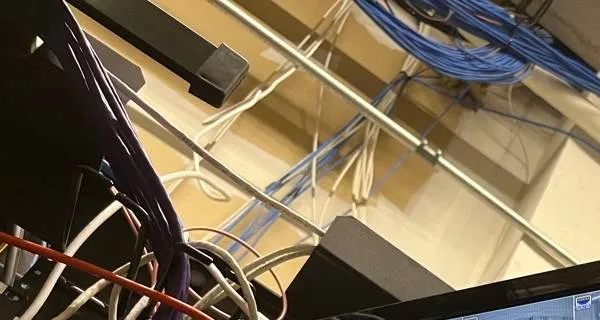
Real AESS job photo, cropped to the ceiling: bundles of blue and white network cables run along a metal pipe above an equipment rack, with purple and orange cables dropping into the rack and a monitor’s corner at the bottom right. Step four happens here: tracing which cable and which switch port the recorder actually uses.
Coverage Area
Hik-Connect App Support Near Manhattan's Landmarks
Six places that frame the borough, from Harlem to the tip of the island, and the buildings and businesses around them that call us about Hik-Connect.
125th Street, Harlem
The business improvement district where, in May 2024, stores were invited to join the city’s pilot for sharing live camera feeds with the NYPD. Around it: walk-ups and brownstones in Central and East Harlem and the shops of Frederick Douglass and Adam Clayton Powell Jr. Boulevards.
Upper West Side lobbies
Where a man in a Fresh Direct coat was filmed taking packages from the lobbies of at least three buildings in 2018. The pre-war co-ops of West End Avenue and Riverside Drive keep their recorders in basement super’s offices.
One Vanderbilt and Grand Central
The 1,401-foot tower built under the Greater East Midtown rezoning, beside the terminal. The office floors and suites of Midtown East around it often run their own recorders behind building or tenant firewalls.
SoHo-Cast Iron Historic District
Designated in 1973, about 26 blocks and nearly 500 buildings. Retail at street level, lofts above, landmark rules on the fronts and Wi-Fi cameras fighting thick walls.
25 Water Street, Financial District
The former office tower being turned into 1,320 apartments, the largest office-to-residential conversion in the country according to The Architect’s Newspaper. The Lower Manhattan conversions around it bring new lobbies and new camera accounts to hand over.
375 Pearl Street, Civic Center
The 32-storey former telephone building at the Manhattan end of the Brooklyn Bridge, completed in 1975 and redeveloped as a data center. Around it: Two Bridges, Chinatown and the Seaport, with walk-ups and storefronts on owners’ own internet lines.
We also handle Hik-Connect calls in Inwood, Washington Heights, Hamilton Heights, Morningside Heights, East Harlem, Yorkville, Lenox Hill, Carnegie Hill, Lincoln Square, Hell’s Kitchen, Chelsea, the Flatiron District, Gramercy, Murray Hill, Kips Bay, Stuyvesant Town, the East Village, the Lower East Side, Greenwich Village, the West Village, NoHo, Tribeca, Battery Park City and Roosevelt Island. Neighboring boroughs are covered on their own pages: the Bronx, Queens and Brooklyn.
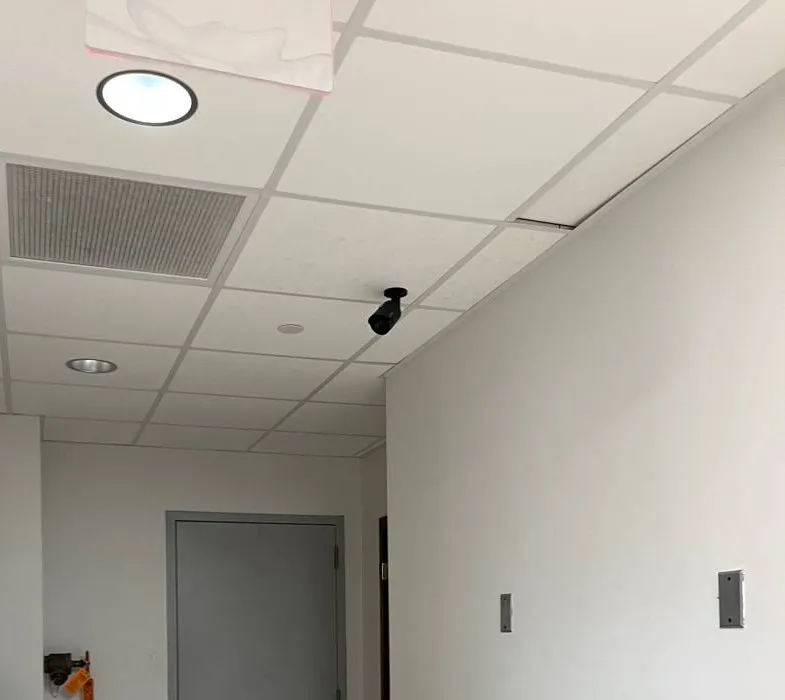
Real AESS job photo, cropped: a small black bullet camera on a white drop ceiling in a narrow corridor, aimed toward a grey door at the far end, with a recessed light and an air grille above. Service corridors and back doors like this are the views a desk or a manager most often needs on the app.
Pricing
Hik-Connect App Support Cost in Manhattan
Hik-Connect repair is mostly labor and coordination, so most Manhattan jobs are priced by the visit. Where the recorder itself has to be replaced, we use our published recorder replacement figures with the Manhattan 1.25× area rate applied. We don’t sell a monthly plan for app support.
Job
Manhattan price
What moves it
Diagnosis by phone or from screenshots
$0
Nothing — we tell you whether it looks like account, network or hardware before anyone travels
On-site app, account and network repair
$195 an hour, 3-hour minimum ($585)
How many people must be reached for ownership transfer, whether the provider or IT contractor has to attend, how many users need access set up
4-channel recorder replacement
$563–$875
Drive size for the days the building keeps, whether existing cameras are compatible
8-channel recorder replacement
$813–$1,250
More channels to name and share, larger drive
8-channel hybrid recorder
$1,000–$1,500
Takes coax and network cameras, useful where old analog cameras remain
16-channel building or store recorder
$1,500–$2,750
Lobby, package room, garage and service doors on one recorder; role-based access
32-channel recorder
$2,750 and up
Large buildings and complexes, quoted after a walk-through
Replacement cameras
Quoted per camera
Brand and model chosen for compatibility with the recorder that stays
What raises a Manhattan price. Ownership transfers where the previous account holder can’t be reached and a documented reset with Hikvision support is needed. Buildings where the internet provider or the building IT contractor must attend, because their time sets the schedule. Recorders in equipment rooms that require a freight elevator booking or an escort. Systems where several recorders across a building or several stores all need the same work.
What lowers it. Screenshots and a label photo sent ahead. The current account holder on the phone at the start of the visit. The router password and the telecom room key ready. A board that has already decided who should own the account.
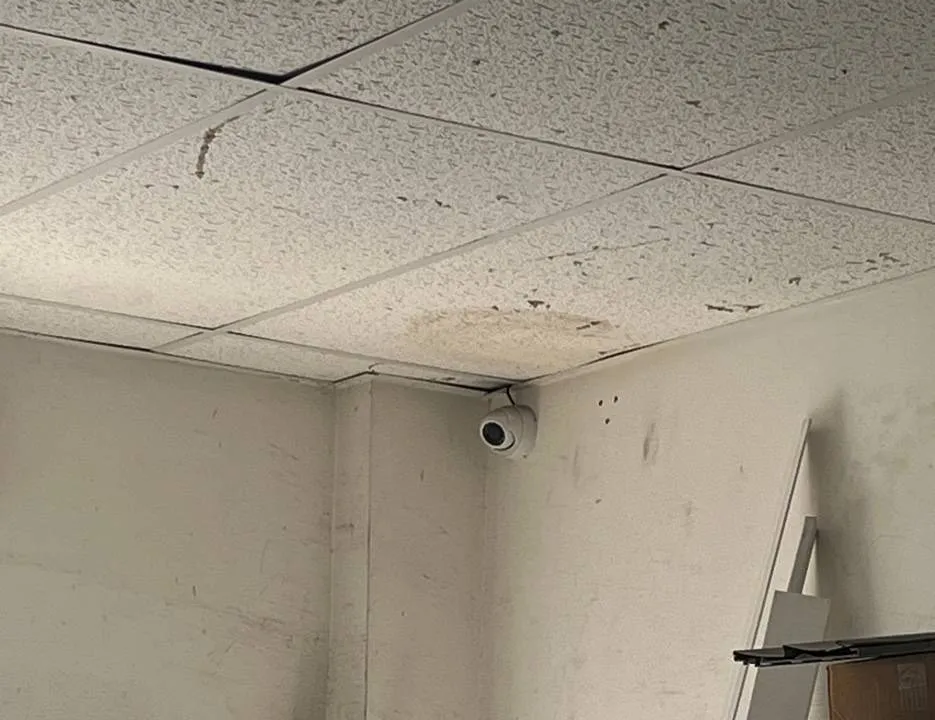
Real AESS job photo, cropped above the stored boxes: a small white dome camera tucked into the corner where a stained drop ceiling meets scuffed white walls, with long boards leaning at the right. A storeroom camera is often the one a store owner checks from home, so it is the first one they notice missing from the app.
Get a Written Manhattan Price Before the Visit
Most Hik-Connect jobs can be priced from screenshots and a label photo. Send them and we will tell you whether it is a single service visit or a recorder replacement, and what the Manhattan figure is.
Three starting points at Manhattan rates. The first is free, the second covers most app and account repairs, and the third is for when the recorder itself has to go.
Remote Triage
$0
Phone call, screenshots and label photo. We tell you whether the problem is the account, the network or the hardware, who needs to be involved, and what the visit will cost. Some network faults are fixed on the call with the super at the recorder.
On-Site Repair Visit
$195/hr · 3-hr min ($585)
Account, network and access in one visit. Platform Access restored, ownership moved to the building or business, shares for each role, firmware checked, port forwards closed and a hand-over sheet for the file.
Recorder Replacement
$563–$2,750
4- to 16-channel, at Manhattan rates. New recorder and drive on the cameras you have, accounts and shares rebuilt, the old drive kept readable for retained footage. Larger systems quoted after a walk-through.
Already bought the equipment? Labor-only work
If you bought a recorder, cameras or a router yourself, we install and configure them at the service rate. Before the visit we check that the recorder accepts your cameras and supports Hik-Connect or the remote-access method you want, and, for Hikvision equipment bought after July 16, 2026, we ask where it came from, because the FCC order prohibits continued importation and marketing of covered equipment in the U.S.
Each recorder, drive and camera also carries its maker’s own warranty where the maker still honours it. Our own terms are set out in the service agreement, summarised at the bottom of this page.
Complete Services
Every Hik-Connect App Support Service in Manhattan
Hik-Connect is one piece of a building’s security. These Manhattan pages cover the rest, so a single visit can handle what’s connected.
Field Notes: Write Down Who Owns the Account the Day the System Goes In
This is a method note rather than a story about one building. Across Manhattan Hik-Connect calls, the step that decides whether a repair takes one hour or three weeks is whether anyone wrote down, on the day the system went in, which account the recorder was bound to and who could receive that account’s security codes. When it was written down, a lost phone or a departed super is a short visit. When it wasn’t, we are chasing an installer’s old email, a former agent’s office or Hikvision support for a reset, while the lobby is off the app.
So we leave every Manhattan system with a single sheet: the recorder model and serial, the account email and who controls it, the verification code, every person the device is shared with and what they can do, the router and port the recorder uses, and who to call about the internet line. It lives in the managing agent’s file and in the super’s office. Boards that keep that sheet up to date rarely need us for Hik-Connect again — which is the point.
FAQ
Manhattan Hik-Connect App Support FAQ
What should a Manhattan co-op put in its camera-access policy before handing out app logins?
+
Four things: who may view live video, who may play back and export, how a resident or police request is made and logged, and how long footage is kept. A New York management firm recommends routing requests through the property manager, logging every access, keeping footage 30 to 90 days, and not giving residents copies without board and legal approval. Once the policy exists, we build the Hik-Connect shares to match it, one account per role, so the app enforces what the board decided instead of relying on everyone remembering it.
How many days of footage should a doorman building keep on its recorder?
+
Enough to cover the gap between an incident and someone noticing it. FirstService Residential, which manages New York co-ops and condos, says footage is generally stored for 30 to 90 days depending on building size, storage capacity and legal requirements, with a plan to delete it securely afterward. On a Hikvision recorder that is a question of drive size, camera count and recording settings; we size the drive or adjust the recording so the building actually reaches the number of days its policy states.
Who has to approve the work before you touch a co-op’s recorder?
+
Whoever the building says controls the system, which is usually the managing agent acting for the board. We take the booking from the agent or with the agent copied, confirm in writing who will own the Hik-Connect account at the end, and work with the super on site. If the agent requires a certificate of insurance before contractors enter, we send it ahead. We don’t move ownership of a building’s device to anyone on the say-so of a single resident.
Can Hik-Connect ring the lobby door station on phones as well as show the cameras?
+
If the building has a Hikvision video intercom, yes — Hik-Connect handles video intercoms as well as recorders and cameras, and Hikvision lists intercom management among the Hik-Connect for Teams features. We set which phones are called from the entry panel, for example the super after hours and the desk during the day, and keep that separate from who can see recorded footage. Buildings with another intercom brand need that maker’s app for the door.
Is the Hik-Connect app itself free to use?
+
The app is listed as free on Google Play and connects to DVRs, NVRs, cameras, video intercoms and security control panels. Hikvision also offers a paid cloud storage service for video clips, and installers can sell their own services on top. You don’t need a subscription to see your own recorder in the app. What costs money is the work of fixing the connection, the account or the hardware when it breaks.
Which details from the recorder’s label should we send before the visit?
+
A clear photo of the whole label: model number, serial number and the device verification code if one is printed. Hik-Connect asks for the verification code when a device is added or transferred, and Hikvision notes the default is usually on the label; if someone changed it when enabling the service, the label code will no longer work and we need to know that early. Send the photo privately to our Manhattan number, not to a group chat.
If we sell the building or the store, how does the camera account pass to the buyer?
+
Through Hik-Connect’s Transfer Device feature, done before the closing while you can still receive codes. The current owner starts the transfer, enters the security code sent to the registered phone or email, then the buyer’s account and the device verification code; the buyer gets full configuration and operation permissions and the device disappears from your account. Remove your shares, change the recorder’s admin password and hand the buyer the system sheet. We can do it with both sides on the phone.
Can the system be set so it never records sound?
+
Yes. Many Hikvision cameras have built-in microphones, and audio is a legal risk in New York: recording a conversation without the consent of at least one party is eavesdropping under Penal Law 250.05. We switch audio off at each camera and in the recorder’s channel settings, and turn off two-way audio permissions in the Hik-Connect shares. If an owner has a lawful reason to record audio in a particular spot, that is a decision for their lawyer, with posted notice, not a default.
Can footage be saved to the cloud instead of only the basement recorder?
+
Hikvision offers a cloud storage service that backs up video clips for viewing in the Hik-Connect app, and its privacy policy says stored video is encrypted. For most Manhattan buildings it works best as a backup for important event clips rather than a replacement for the recorder’s drive, because continuous video from many cameras needs a lot of upload bandwidth. If a board wants an off-site copy, we price both the cloud option and a second recorder in another part of the building.
How long does a typical Hik-Connect repair visit take in a Manhattan building?
+
Most visits fit inside the three-hour minimum. Restoring the connection and setting up shares often takes an hour or two once we are at the recorder with the router accessible. What stretches a visit is waiting: for an elevator or escort to the equipment room, for the internet provider’s technician, or for a former account holder to approve a transfer. That is why we line those people up before booking, and why we tell you in advance if the job needs a second visit.
All Areas Served
Hik-Connect App Support Across New York City, Long Island and the Hudson Valley
Manhattan is one of the five boroughs covered by the NYC Hik-Connect app support hub. Each borough, county and regional page below deals with its own buildings, internet set-ups and local rules.
The housing figures, federal rules, Hikvision procedures, news items and laws on this page come from the publications below. Items marked “excerpt” were read only as a search-result snippet. AESS prices are our standard service rate and our published recorder replacement figures with the 1.25× Manhattan area rate applied.
Lobby Gone From the App Before Tonight’s Shift? Call the Manhattan Line
Cameras grey in Hik-Connect, a device stuck under an old installer’s account, a new agent with no way in — phone (929) 560-0737. We book the next open two-hour window, and most systems are back in the app within one to two hours of arrival.
Manhattan Hik-Connect Support From a Licensed, Insured Crew
Manhattan line (929) 560-0737 · Abstract Enterprises Security Systems, 460 E Fordham Rd, Bronx, NY 10458 · messages by WhatsApp
4.7★ from 201 Google reviews · same-day written estimates · certificates of insurance for managing agents on request · NYS low-voltage license #12000287431
Full terms — including 50% deposit, one-year parts-only warranty on AESS-supplied products, and the late-fee schedule — are set out in the service agreement. See our warranty page.
Page reviewed and updated October 18, 2026. Changelog: Manhattan Hik-Connect app support page rebuilt from new research on the borough’s apartment stock and tenure, co-op and condo footage-access practice, Hikvision’s offline, transfer, sharing and password-reset procedures, Hik-Connect for Teams, the FCC’s 2022 authorization rules and July 2026 import and marketing prohibition, CVE-2021-36260, the 2024 NYPD camera-sharing pilot on 125th Street and local lobby package thefts, with prices at the standard service rate and the 1.25× Manhattan area rate.