Akuvox vs ButterflyMX, model by model: Akuvox S532, S535, S539, X912, X910, R29, E18 and A02 · ButterflyMX 8-inch and 12-inch panels, Keypad and Access Control · Updated November 2026
Akuvox vs ButterflyMX is decided by who you want to keep paying and who will run the system: for most New York walk-ups, co-ops, condos and owner-managed buildings that want to own their intercom, keep screens in the apartments and avoid a yearly fee for every unit, we would put in Akuvox, and for professionally managed rental buildings where every resident answers on a phone and the manager wants one cloud dashboard with the maker's own support line, we would put in ButterflyMX.
Quick answer: Pick Akuvox if the building wants a wide choice of door stations from a single-button unit up to a 10-inch screen, optional indoor monitors in each apartment, face, card, PIN, Bluetooth and QR-code entry, and the option to run on the local network without paying a cloud fee for every apartment. Pick ButterflyMX if residents only need a phone app, the managing agent wants one cloud platform for doors, gates, elevators and package rooms, and the owner is happy to pay ButterflyMX's annual software fee per apartment. We install both in New York City. Our NYC intercom page lists Akuvox smart IP intercoms starting at $950 and ButterflyMX smartphone-based intercoms starting at $1,500, every building is quoted in writing after we see it, and we book requests within 2 hours.
Both are true IP video intercoms. Each puts a camera and a call screen at the street door, rings residents with live video, and releases a door strike or magnetic lock from a phone. The difference is the business model behind the panel: Akuvox is a hardware maker that sells stations, monitors, readers and software through installers, and ButterflyMX is a New York City company that sells its own panels and readers together with a yearly cloud subscription it runs itself.
If you searched it the other way round, ButterflyMX vs Akuvox, this is the same page and the same answer. Every specification below comes from the makers' own product, specification and pricing pages on akuvox.com, knowledge.akuvox.com and butterflymx.com, read on November 16, 2026, and every opinion comes from the doors we wire, program and fix in the five boroughs.
Reviewed and updated November 16, 2026, against Akuvox's key-specification pages for the S532, S535, S539, X912, X910, R29, E18 and A02, its SmartPlus, My MobileKey and software page, and its knowledge-base pages on device power supplies, 12-volt outputs and the SmartPlus installer guide (akuvox.com and knowledge.akuvox.com); ButterflyMX's video intercom, 8-inch surface panel, Keypad, Access Control System, pricing and About pages (butterflymx.com); and a live search of what ranks for "Akuvox vs ButterflyMX" and "ButterflyMX vs Akuvox" (a Reddit thread from San Francisco tenants, installer comparisons, a New York locksmith's co-op guide and ButterflyMX's own Akuvox review among them). Where a maker's page did not state something, this page says so instead of guessing. Our installed prices come from our NYC intercom installation and ButterflyMX pages and sit in their own section. · Checked by the Abstract Enterprises Security Systems team (NYS license #12000287431), Troy Avenue, Brooklyn
Owner-operated since 2002 · Thousands of jobs completed · Booked within 2 hours
The short version. An Akuvox door station and a ButterflyMX panel do the same basic job. Each one sits at the street door or the lobby entrance, shows visitors a directory, rings the right apartment with live video and two-way audio, and closes a relay that releases the lock. Both let residents open the door from a phone, both handle fobs, cards and PIN codes, and both can be extended to side doors, gates, garages and elevators. If the lobby were all that mattered, you could flip a coin.
The lobby is not all that matters in New York. A co-op board in Jackson Heights wants older shareholders to keep answering the door on a screen in the kitchen, not only on a phone. A small landlord in Bushwick with twelve apartments wants video and fobs without a bill for every unit every year. A managing agent with forty rental buildings across three boroughs wants one login for every door, move-outs that cut off access instantly, delivery codes that just work, and a vendor support line when something breaks at 7 in the evening. Those are different jobs, and the two brands were built for them in that order: Akuvox makes a very wide range of hardware and lets the installer and owner decide how to run it, and ButterflyMX built one platform, with its own panels and its own cloud, and sells it as a service to property managers.
We are a licensed New York State security installer (license #12000287431) on Troy Avenue in Brooklyn, and we install, program and service both brands, alongside DoorBird, 2N, Aiphone, Comelit and the older audio buzzer systems still found in most of the city's walk-ups. The rest of this page goes through the differences that decide a real job: panels and directories, cameras, how residents answer, readers and mobile credentials, relays and power, wiring in old buildings, the apps and what they cost to keep running, management, warranties, and which brand we would put on which kind of property. If you already know you want a building-wide system, our apartment intercom systems page covers the wider choice, our ButterflyMX installation page covers that brand in depth, and our NYC intercom installation page covers every brand we carry. Comparing other intercoms too? See our DoorBird vs 2N comparison.
Here are the two brands side by side on the points that come up on real New York jobs. Figures are the makers' own, from the product, specification and pricing pages named in the sections further down; where a figure differs between models, the model is named. Where a maker's page did not state something, the cell says so.
| What matters | Akuvox | ButterflyMX |
|---|---|---|
| Who makes it | Akuvox, a smart intercom maker whose press releases are datelined Xiamen, China; sold through distributors and installers | ButterflyMX, founded in 2014 by Cyrus Claffey; global headquarters in New York City, with offices in Toronto and Croatia |
| How you buy it | Hardware bought once through an installer; cloud features in the SmartPlus app are activated per project where used | One-time hardware fee plus an annual software fee per apartment unit, both set by ButterflyMX |
| Lines we compare | S532, S535 and S539 (S series), X912 and X910 (X series), R29 and E18 touchscreen stations, single-button and keypad stations, A02 reader, indoor monitors | 8-inch and 12-inch video intercoms, each surface or recessed; Keypad; Access Control System with Mullion, Keypad and Single Gang readers |
| Screen at the door | From none on single-button stations to 4 inches (X912), 5 inches (S535), 7 inches (R29 at 1280 × 800, E18 at 600 × 1024) and 10 inches (S539) | 8-inch (720 × 1280) or 12-inch (1280 × 800) capacitive multi-touch screen, auto-adjusting LED up to 1,500 nits |
| Camera | S535: 2 MP, up to 1920 × 1080 at 30 fps, HDR, 0.1 lux; X912 and S539: starlight main camera plus a second camera against photo spoofing; R29S: 3 MP | Wide-angle camera, adaptive bitrate up to 1080p HD video |
| Field of view | S532: 130° horizontal × 90° vertical; S535: 110° × 62° in its video specs (116° × 62° in its summary) | 156° field of view |
| How residents answer | SmartPlus app, Akuvox indoor monitors, or both (monitor first with the app as backup); SIP phones and PBXs | ButterflyMX mobile app; no in-apartment hardware needed |
| Ways in | Depending on model: face, PIN, 13.56 MHz and 125 kHz cards, NFC, Bluetooth, QR code, HID iCLASS version (X912K), Apple Wallet as a paid SmartPlus feature | Mobile app, fobs, keycards, PIN codes, virtual keys, delivery PINs and visitor passes |
| Relays at the panel | S535: 1 relay and 2 inputs; S532: 2 relays; controllers such as the A094 add more | Four dry-contact relays with adjustable timings, 2 A, 62.5 VA |
| Power | Power over Ethernet (802.3af or 802.3at) on nearly every door station in Akuvox's power table, or a DC adapter; 2-wire versions of the R20A and R20K | Standard NEMA 5-15 socket, 9 to 24 VDC panel input, 12.7 W standard and 34 W maximum at 24 VDC; dedicated circuit on a UPS advised |
| Weather and vandal rating | S535, S532, S539, X910: IP66 and IK08; X912S: IP65 and IK10; R29 and E18: IP65 | Video intercoms: IP65, cast aluminium alloy, vandal-resistant polycarbonate screen; Keypad: IP55 |
| Operating temperature | S535: −40 °C to +55 °C | Video intercoms: −40 °F to +140 °F (−40 °C to +60 °C) |
| Running it without the cloud | Yes: stations call indoor monitors or SIP phones on the local network, and Akuvox sells on-premise SDMC and PC-based ACMS software | ButterflyMX describes a cloud-based platform managed from any smartphone or computer; the pages we read did not describe a local-only mode |
| Ongoing fee | Only for the SmartPlus cloud services and paid features a building chooses; prices not published on the pages we read | Annual software fee of $30 to $42 per apartment unit, per ButterflyMX's pricing page |
| Hardware warranty | Not stated on the Akuvox product pages we read | Two years against malfunction or failure, not against vandalism or incorrect installation |
| Best for | Owner-run walk-ups, co-ops and condos, buildings that want indoor monitors, houses and small offices, and projects mixing intercom with elevator and door access | Managed rental buildings, student housing and portfolios where residents live on their phones and one cloud dashboard runs every door |
The table makes Akuvox look like the more capable hardware line, and on paper it is: more models, more screen sizes, more ways to open the door and the option to stay off the cloud. ButterflyMX's strength does not fit in a spec table. It is one company answering for the panel, the app, the dashboard and the support line, and for a managing agent that is often worth more than an extra camera. The rest of the page shows where each of those advantages actually matters on a New York door.
If you are a small landlord or a co-op board and you are not sure, we usually start from Akuvox, because the long-run cost is lower and the building is not tied to one company's cloud. If you are a managing agent with a portfolio and an operations team, we usually start from ButterflyMX, because the time it saves on keys, fobs and phone calls is real. Either way, the quote shows both the installed price and any subscription the maker charges, so the board or the owner sees the full cost before signing. If cameras are part of the same plan, start with our security camera brands comparison, the hub page that links to every comparison we have published.
Knowing who stands behind an intercom matters more than with most security gear, because a lobby panel is expected to last a decade or more and the app on residents' phones has to keep working for all of it.
Akuvox describes itself as a smart intercom brand, and its press releases carry a Xiamen, China dateline. Its catalogue is wide: door phones from compact single-button stations to the 10-inch S539, indoor monitors, access control terminals and controllers, an elevator controller, IP phones, and a set of software products. On the software side, Akuvox lists the SmartPlus app and its cloud intercom service, the My MobileKey Bluetooth credential app, an Installer Kit Tool that auto-collects device network information and uploads projects to the cloud, the PC-based ACMS and ACMS Pro access control software, and SDMC, which Akuvox calls on-premise software for community-wide intercom management. Its own website says it targets enterprise users, and in practice you buy Akuvox through a distributor and an installer rather than from Akuvox directly.
That model has two consequences for a New York building. First, the installer matters: Akuvox gives us a lot of configuration freedom, which is good when it is set up well and frustrating when it is not. Second, the building owns the hardware outright and can choose how much of Akuvox's cloud to use, from none at all to the full SmartPlus app with premium features.
ButterflyMX says it was founded in 2014 by Cyrus Claffey, has its global headquarters in New York City, its Canadian headquarters in Toronto and its European headquarters in Croatia, and that more than 20,000 properties use it. It sells its own video intercoms, keypads, readers, access controllers, elevator controls, package rooms and vehicle access, all managed through one cloud platform and one mobile app. Its FAQ is clear about the split of work: ButterflyMX makes and supports the products and the software, and a local low-voltage installer puts them in.
For a building, that means one company answers for the panel, the app and the dashboard, and that company sends new features to every property automatically. It also means the building is a ButterflyMX customer for as long as it uses the system, paying the yearly software fee that keeps the video, remote access and updates running.
Neither model is wrong. Owning Akuvox hardware outright suits boards and owners who think in decades and want to choose their own installer. Subscribing to ButterflyMX suits managers who think in operating budgets and want one throat to choke. What you should not do is pick on the panel alone and discover the business model later, which is the most common regret we hear when a building calls us to take over an intercom someone else chose.

Akuvox has far more models than ButterflyMX, so it helps to know which ones we mean when we compare them.
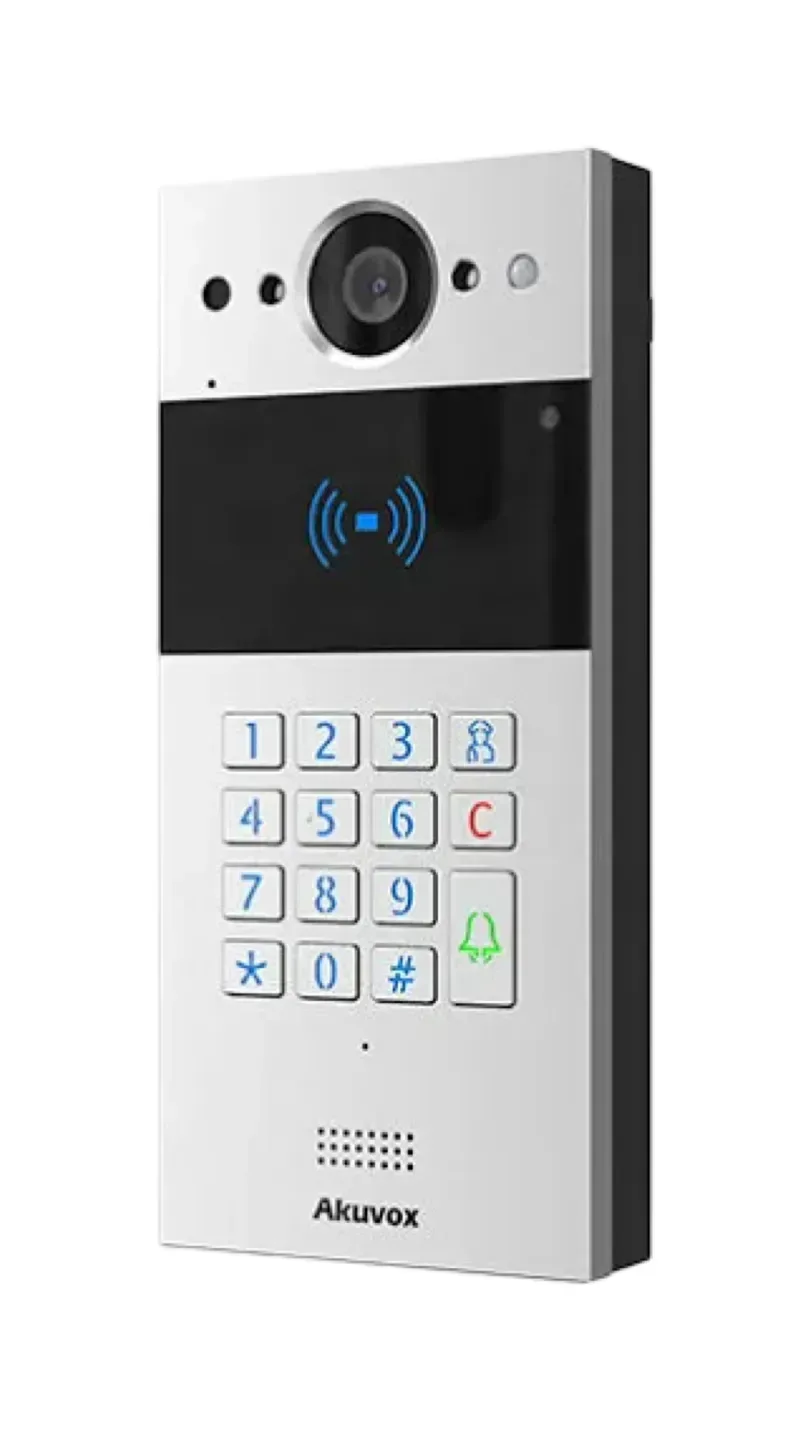
S532. A keypad station with an RF card reader, aluminium die-cast body, a 130-degree by 90-degree wide-angle camera, PIN, IC, ID, NFC and Bluetooth access, two output relays, PoE+ or an external supply, and IP66 and IK08 ratings. Akuvox sells it in three versions: an IP version, a "hybrid" standard version that also supports an analog audio handset, and an induction-loop version for hearing-aid users. Akuvox's product listing calls it a 2.8-inch video door phone while its key-spec page lists an 8-inch LCD, so we confirm the exact version on the datasheet before quoting.
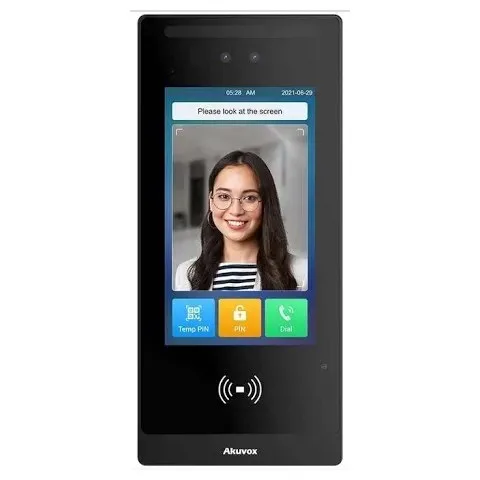
S535. A 5-inch touchscreen station in an aluminium panel, running Linux, with a 2-megapixel HDR camera, face, card, PIN, Bluetooth and QR-code entry, 13.56 MHz, 125 kHz and NFC card reading, Wiegand and RS-485 ports, one relay and two inputs, and expansion modules for LTE, a fingerprint reader or an induction loop. It is rated IP66 and IK08 and works from −40 °C to +55 °C.
S539. Akuvox's 10-inch Android 12 door phone, with a vandal-resistant body, a main camera with built-in HDR and starlight, dual cameras against photo and video spoofing, an extra camera for QR codes, and PoE+ or an external supply.
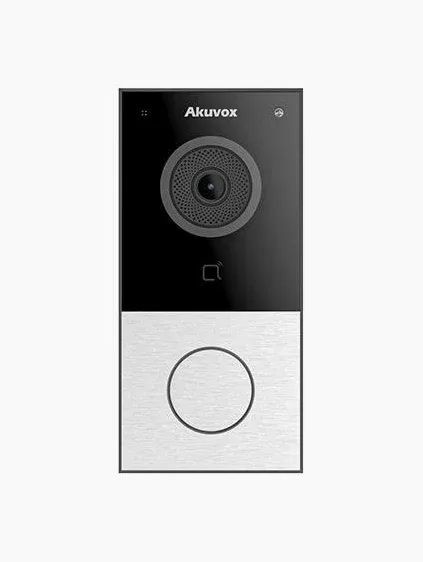
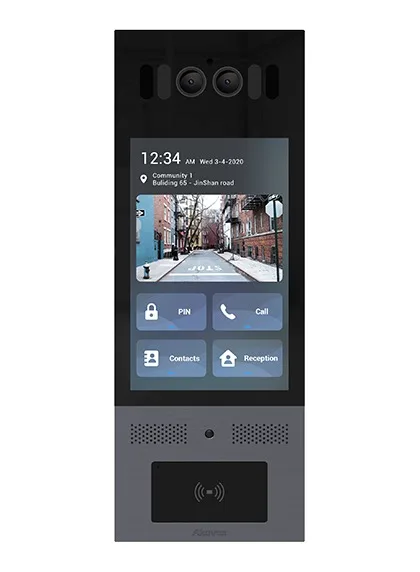
X912 and X910. The X912 is a compact vandal-resistant station with a 4-inch touchscreen, dual cameras with a starlight main camera, a numeric keypad, QR-code scanning, face recognition and IC, ID, NFC and Bluetooth access. The stainless X912S is rated IP65 and IK10; the aluminium X912K is IP65 and IK08 and also comes in an HID iCLASS version. The X910 is a single-button station Akuvox aims at high-end homes, with dual cameras, a 13.56 MHz NFC reader, parcel detection, and IP66 and IK08 ratings.
R29 and E18. Two 7-inch touchscreen stations with facial recognition. The R29 has a 1280 × 800 screen, runs Android, and comes with a 3-megapixel camera (R29S) or dual cameras (R29C), IP65 and IK06, and Wiegand. The E18 has a 600 × 1024 screen, a 2-megapixel WDR camera, Wiegand and RS-485, IP65 and optional LTE.
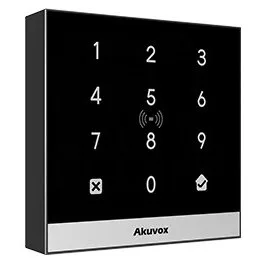
A02. Not an intercom but an access control terminal: a touch keypad and card reader with a built-in controller, PIN and card entry, two-factor authentication, 20,000 cards and 100,000 event logs, IP65, and PoE or a 12-volt supply.
Video intercoms. ButterflyMX sells four panels: an 8-inch surface model, an 8-inch recessed model, a 12-inch surface model and a 12-inch recessed model. They share the same specification sheet: a cast aluminium alloy housing, IP65, a wide-angle camera with a 156-degree field of view, adaptive bitrate up to 1080p, infrared proximity sensors for motion detection, Wi-Fi and RFID, two USB 3 ports, four dry-contact relays, and a capacitive multi-touch screen up to 1,500 nits. The 8-inch surface panel measures 11.5 by 5.6 by 2.4 inches, the 12-inch recessed panel 13.3 by 13.6 by 2.4 inches.
Keypad. A black PIN and credential reader with a tri-colour LED bar and buzzer, a 2-inch read range, mobile app, fob and keycard support, an EAL6+ cryptographic module, OSDP secure channel, IP55 and UL 294. It is powered from, and gets its internet through, ButterflyMX's cloud-based Access Controller.
Access Control System. A cloud-based access controller for doors, gates and garages with three reader options, the Mullion, the Keypad and the Single Gang. ButterflyMX says it installs over most existing access control systems and only needs an internet connection and a power supply.
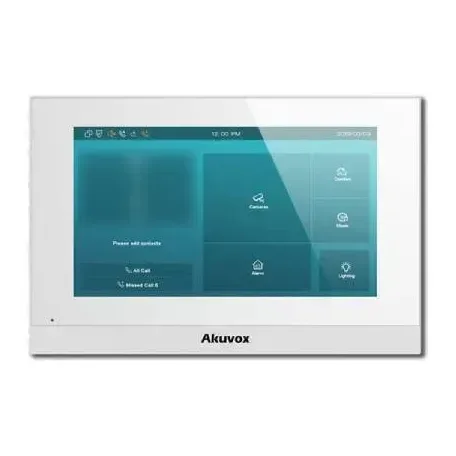
This is where the two lines part company. Akuvox lists a range of indoor monitors, including the X937, X933, S567, S565, S563, S562, S560, IT88, C319, C316, C315, C313 and C310, some powered over Ethernet, some by a 12-volt adapter, one in a 2-wire version, and Wi-Fi variants such as the S563W hardware its Installer Kit Tool is built on. ButterflyMX sells no indoor monitor; its 8-inch panel page tells owners they will not have to wire the entire building or install expensive in-unit hardware.
The first thing anyone notices about an intercom is the face it shows the street. In a New York lobby that face has to do three jobs: let a visitor find the right apartment quickly, let a courier get in without ringing ten people, and survive years of rain, gloves, keys and the occasional kick.
Every ButterflyMX video intercom is a touchscreen. The 8-inch panels run at 720 × 1280 in portrait, the 12-inch panels at 1280 × 800, and ButterflyMX lists capacitive touch with multi-touch capability, an auto-adjusting LED with up to 1,500 nits of brightness, and a vandal-resistant polycarbonate display. ButterflyMX's own product pages show the screens a visitor moves through: a welcome screen with a delivery option, a resident directory, video calling and visitor passes. Because the directory lives on ButterflyMX's cloud, the managing agent adds or removes a name from a computer and every panel in the building updates.
The 1,500-nit figure matters on a south-facing stoop in the afternoon. Most of the complaints we hear about any brand of touchscreen intercom are about glare, and a bright screen helps. So does a recessed mount, which ButterflyMX offers in both sizes, or a hood over the panel.
Akuvox lets you choose the screen to suit the door. A single-button station for a house has no screen at all. A keypad station such as the S532 shows a short directory and takes apartment numbers on physical keys, which many older residents and most delivery drivers still find quicker than scrolling. The X912 has a 4-inch touchscreen above a keypad, the S535 a 5-inch IPS touchscreen, the R29 and E18 a 7-inch screen, and the S539 a 10-inch screen that Akuvox says presents unique information.
The keypad matters more than spec sheets admit. In a pre-war walk-up where half the residents are over seventy and the other half order three deliveries a day, a station where you punch "4B" and press the bell is often the right answer, and that is a station ButterflyMX does not make. In a new condo lobby with a concierge desk and glass everywhere, a large touchscreen is part of the design, and either brand can supply one.

For a walk-up of four to twenty apartments we usually fit an Akuvox keypad station. For a lobby of twenty to two hundred apartments we look at a large touchscreen from either brand, and the choice between them is then made by everything else on this page: monitors, fees and management. For a doorman building, where the intercom mostly rings the desk, we often recommend a simpler station at the street door and the investment at the desk instead.
An intercom camera has a harder job than most security cameras. It sits at chest height, a foot from faces, often facing a bright street from a dark vestibule, and it has to show a resident who is pressing the button well enough to decide whether to open the door.
ButterflyMX lists a wide-angle camera with a 156-degree field of view and adaptive bitrate for up to 1080p HD video, plus infrared proximity sensors for motion detection. Adaptive bitrate means the video quality steps down when the building's internet connection is slow rather than freezing, which matters on the shared cable or DSL lines still common in small New York buildings. ButterflyMX also stores a time- and date-stamped photo of every door release, viewable in the app, and its Keypad page says those entry photos are kept for 365 days. For a managing agent dealing with a package theft or a disputed entry, that photo log is one of ButterflyMX's most useful features.
The ButterflyMX pages we read did not give a sensor size, a low-light rating in lux or an infrared illumination figure for the panel camera, so we cannot compare its night performance on paper.
Akuvox publishes much more detail, and it varies by station. The S535 lists a 1/2.9-inch CMOS sensor, 2 megapixels, video up to 1920 × 1080 at 30 frames per second, HDR, a minimum illumination of 0.1 lux, auto night mode with LED illumination and automatic white balance. Its video specification gives a 110-degree horizontal by 62-degree vertical viewing angle, while its summary says 116 degrees horizontal, so we treat it as roughly 110 to 116 degrees wide. The S532 lists 130 degrees horizontal by 90 degrees vertical. The X912 and the S539 pair a starlight main camera with a second camera, which Akuvox says is there to defeat face spoofing with a photo or a video; the S539 adds a third camera just for scanning QR codes. The R29S lists 3 megapixels with automatic lighting and the E18 2 megapixels with WDR.
Akuvox stations also work as network cameras for the rest of the building's security system. Several models carry the ONVIF mark, and the S535's specification says it is compatible with third-party video components such as NVRs and supports RTSP. That means the lobby station's view can be recorded on the same recorder as the building's other cameras, which we set up on most Akuvox jobs that also include a camera system.
On paper ButterflyMX's 156-degree lens is wider than the Akuvox S-series lenses, and in a narrow vestibule a wide lens helps you see a visitor standing to one side of the panel. In practice the bigger difference at night is light. A vestibule with one dim bulb defeats every intercom camera, and the fix is usually a better fixture rather than a better panel. Where a building wants face recognition at the door, Akuvox's dual-camera models are the ones we trust not to open for a photo held up to the lens. The ButterflyMX pages we read do not list face recognition as a way in.
If the building also wants proper recorded video of the entrance, as most insurers and many boards now do, plan a separate camera above the door either way. Our camera brands page covers the recorder side.
This is the single biggest practical difference between the two brands, and it decides more New York jobs than any camera figure.
ButterflyMX is built on the idea that the resident's smartphone replaces the handset on the kitchen wall. A visitor taps a name, the resident's phone rings with live video, and the resident opens the door from the app, from anywhere. ButterflyMX's app also opens doors, gates, garages and elevators, and its Keypad page says residents can connect an Alexa- or Siri-enabled device and unlock with their voice. ButterflyMX's 8-inch surface panel page presents the lack of in-apartment hardware as the point: you will not have to wire the entire building or install expensive in-unit hardware.
For a rental building full of residents in their twenties and thirties, that is exactly right. Nobody misses the old handset, the super does not have to replace dead buzzers inside apartments, and move-outs are handled in software. The trade-off is that every resident needs a smartphone, needs to install the app and needs the phone with them, and the system depends on the building's internet and ButterflyMX's cloud for every call.
Akuvox gives the building a choice. Each apartment can have an Akuvox indoor monitor, a touchscreen that rings when the visitor presses that apartment and opens the door with one tap. Residents can use the SmartPlus app on their phones. Or they can have both: Akuvox's SmartPlus installer guide describes a call type of "indoor monitors with SmartPlus as backup," where the monitor rings first and the app rings if the monitor is not answered, and a project setting that requires at least one indoor monitor in each apartment or not, as the building prefers.
Because Akuvox stations speak SIP, they can also ring ordinary SIP desk phones and office phone systems, which suits a building with a management office or a store at street level. Akuvox lists a "Landline Service" in SmartPlus that connects intercom calls to telephones and mobile phones, and marks it as a premium feature.

In the co-ops and older rentals we work in, there is almost always a group of residents who do not want to answer the door on a phone: shareholders in their eighties, residents with a shared family phone, home health aides who need to buzz someone in, and parents who want a screen the kids can use. For those buildings, ButterflyMX's app-only design is a real problem, and boards notice it at the first meeting. Akuvox lets those apartments keep a screen while the residents who prefer phones use the app, which is why it is our default recommendation for owner-occupied buildings. Running cable to every apartment for a monitor is the expensive part, and the section on wiring below covers the ways around it.
Ringing a resident is only half of what an apartment intercom does. The other half is letting the people who live and work there in without ringing anyone, and keeping out the people who no longer should be.
ButterflyMX lists five ways in: the mobile app, fobs, keycards, PIN codes and, for visitors, virtual keys and visitor passes that can be revoked at any time. Its Access Control System page shows video calling, virtual keys and a delivery PIN as headline features, and its Keypad takes a 6-digit PIN or a fob, card or phone at a 2-inch read range. On the security side, ButterflyMX lists an EAL6+ cryptographic module and OSDP secure channel for the Keypad, and UL 294 certification for its readers and controllers. Delivery PINs and visitor passes are where ButterflyMX shines in day-to-day use: a resident sends a pass from the app, the courier or guest uses it at the panel, and the manager sees it in the audit trail.
Akuvox offers more ways in, spread across its models. The S535 opens by face, card, PIN, Bluetooth and QR code, reading 13.56 MHz, 125 kHz and NFC cards. The S532 takes PIN, IC, ID, NFC and Bluetooth. The X912 adds QR-code scanning and face recognition, and its X912K version can be ordered with an HID iCLASS reader for buildings already using HID cards. Akuvox's My MobileKey app turns a phone into a Bluetooth credential with wave-to-unlock and a door-opening tab, protected by AES-256 encryption, and its SmartPlus app can add Apple Wallet access so residents can unlock with an iPhone or Apple Watch, which Akuvox describes as a paid feature that must be activated before users can set it up. SmartPlus also handles PIN codes, either as a direct PIN or as apartment number plus PIN.
For extra doors Akuvox sells standalone terminals such as the A02, which combines a door controller and a card reader in one device, supports PIN, RFID and two-factor authentication, holds 20,000 cards and 100,000 event logs, and is rated IP65. Akuvox also lists unified HTTP API support across many of its door phones and access terminals, which matters to integrators tying the intercom to other building software.

Many New York buildings already have a card system from an earlier contractor. Akuvox stations such as the S535 and R29 carry Wiegand ports, and the S535 adds RS-485, so they can work alongside an existing access controller. ButterflyMX says its Access Control System installs over most existing access control systems and needs only internet and power, and its Keypad uses OSDP secure channel. Either can usually be made to coexist with what is there; the question is whether the building wants one system or two, and that is a conversation to have with the board before the quote, not after.
For a managed rental with constant turnover and daily deliveries, ButterflyMX's virtual keys, delivery PINs and photo audit trail save the super real time, and we would not talk a managing agent out of them. For owner-run buildings, schools, medical offices and anything needing face recognition, HID cards or Apple Wallet, Akuvox gives more choices and keeps the credentials on hardware the building owns.
Whatever the brand, the intercom ends at a relay contact that releases a lock, and the lock needs its own power. This is the part of the job that decides whether the door actually opens every time, and it is where many takeover calls start.
ButterflyMX's video intercoms have four dry-contact relays with adjustable timings, rated at 2 amps and 62.5 VA maximum switching power, which is enough to handle the street door, a vestibule door and a couple of other outputs straight from the panel. The panel itself is powered from a standard NEMA 5-15 socket and a 9 to 24 volt DC input, drawing 12.7 watts in normal use and up to 34 watts at 24 volts DC, and ButterflyMX advises coordinating a dedicated electrical circuit on a UPS. Its separate Access Controller runs on 12 to 24 volts DC at 60 watts, works with a request-to-exit motion sensor, an emergency unlock switch, a fire exit momentary switch, a push-to-exit button and a door-state sensor, and drives electric strikes, magnetic locks, electric push and crash bars, elevator panels, gate and garage controllers and dry relays.
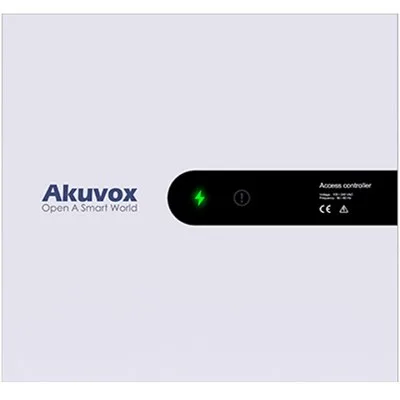
Akuvox stations carry fewer relays on the panel itself, one on the S535 and two on the S532, with two inputs on the S535 for a door contact and an exit button. Several Akuvox stations can also power a small lock or accessory through the relay: Akuvox's knowledge base lists a 12-volt output of up to 1 amp on the X912S and X912K, the S535 and the S539, and 500 milliamps on the S532 and the R29 V1.1, as long as the station itself is fed from a large enough supply. For more doors, Akuvox controllers add outputs: the A094 provides four 12-volt ports at up to 800 milliamps, the A095 eight ports, and the EC33 is Akuvox's elevator controller.

New York building and fire rules shape how a lobby door releases, especially with a magnetic lock, which must let people out freely and drop on a fire alarm signal. With either brand we wire the lock power supply, the exit device and any fire-alarm release first and test them before the panel goes on the wall. We also set the release time with the building: long enough for someone carrying groceries or pushing a stroller to get through, short enough that the door is not left unlatched. ButterflyMX exposes adjustable relay timings on the panel; on Akuvox it is a setting in the station's web interface or in SmartPlus.
If a building only needs a lock and a reader, with no video at all, our access control installation page covers that work, and our door buzzer installation page covers simpler audio systems.
Most of the intercoms we replace in New York are audio buzzer systems from the 1960s to the 1990s, wired with thin multi-conductor cable through walls nobody wants to open. Both brands are network devices, so the question on every job is the same: how do we get a network connection and power to the front door, and what happens inside the apartments?
ButterflyMX says its video intercoms need only three connections at the building: internet, power and the door strike. Its specification lists wired and wireless network capability, with the IP address assigned by DHCP or set statically, and its installer documentation includes cellular connectivity options and wiring guides. Because there is nothing to install inside the apartments, ButterflyMX avoids the most disruptive part of a traditional intercom job. What it does need is a solid internet connection at the front door and a power circuit, ideally dedicated and on a UPS as ButterflyMX advises, which in a pre-war building usually means a new cable run from the cellar or the meter room to the vestibule.
Akuvox door stations take power and data over one network cable from a PoE switch: Akuvox's power table lists 802.3af PoE on the R20, R25, E12, E16, E18 and E21 families and 802.3at PoE+ on the S532, S535, S539 and X912S, with DC adapters as the alternative. For buildings where running new cable is impossible, Akuvox also makes 2-wire versions of the R20A and R20K stations and of the C313 indoor monitor, which run on two conductors, and the hybrid version of the S532 can work with analog audio handsets. Its Wi-Fi indoor monitors, such as the S563W hardware Akuvox's Installer Kit Tool is built on, connect to the apartment's own network instead of a dedicated cable.

We test the old wiring on every survey. Where it is sound, a 2-wire Akuvox system or a hybrid station can reuse some of it; where it is corroded, spliced in a dozen places or shared with the doorbell transformer, we run new cable rather than inherit the old problems. For a ButterflyMX job, the old apartment wiring usually becomes redundant, and the only new cable is the run to the panel and the lock.
Old buzzer panels sit in a hole in the vestibule wall or the door frame, often far larger than any modern station. ButterflyMX's recessed panels measure 15.3 by 8.7 inches (8-inch) and 13.3 by 13.6 inches (12-inch), and its surface panels 11.5 by 5.6 inches and 12.4 by 11.6 inches. Akuvox stations range from palm-sized units to the 210 by 100 millimetre S535 and the larger touchscreen models, flush or surface mounted with Akuvox's boxes and brackets. In both cases we measure the old opening on the survey and quote a trim plate or a patch, so the board is not surprised by a brick hole around a shiny new panel.

With ButterflyMX, nothing goes inside, and we usually disconnect the old handsets and leave them for the super to remove or patch. With Akuvox, apartments that want a monitor get one on a new cable, on Wi-Fi or on the 2-wire bus, and apartments that prefer the app get nothing on the wall. That flexibility costs more labour than an app-only system, which is part of why the installed price of an Akuvox building with monitors in every unit is higher than the starting prices in the price section suggest.
This is the section most boards and owners care about once they see the hardware is comparable, and it is where the two brands differ most. We describe each maker's structure from its own pages; our installed prices are in their own section further down.
ButterflyMX's pricing page is unusually plain about how it charges. It says the property owner pays a one-time fee to purchase the hardware, including video intercoms, access control systems, package rooms, vehicle access systems and elevator controls, and also pays an annual software fee per apartment unit to get live video, remote property access and management, and new feature updates. It puts that software fee at between $30 and $42 per apartment unit per year, depending on the integrations and features added, and says the mobile app, all new features and live support by phone or email are included in the software pricing.
In other words, a 40-unit building on ButterflyMX pays ButterflyMX somewhere between $1,200 and $1,680 a year in software fees on ButterflyMX's own figures, every year the system is in use, on top of the one-time hardware and installation. For a managed rental that cost is usually passed through as an amenity, and the time saved on keys and calls covers it. For a co-op or condo, it is a line in the operating budget the board will vote on every year, and it is worth seeing clearly before signing.
Akuvox does not publish cloud prices on the pages we read, and its model is different. The hardware is bought once. The SmartPlus app works with Akuvox's cloud intercom service, and Akuvox's SmartPlus installer guide describes a feature plan for each community project in which services are enabled as needed, with the installer reviewing requests, arranging payment and activating features. The guide marks specific features as premium or paid, including the landline calling service, Apple Wallet access and the "indoor monitors with SmartPlus as backup" call type, and notes that extra family-member accounts beyond the free ones require activation fees.
Just as important, an Akuvox building does not have to use the cloud at all. Door stations can call indoor monitors and SIP phones on the building's own network, and Akuvox sells on-premise software, SDMC for community-wide intercom management and the PC-based ACMS and ACMS Pro for access control. A building that wants monitors only, with no phone app, can run Akuvox with no ongoing software fee to Akuvox. A building that wants the app for every resident will pay for SmartPlus, at a rate we quote in writing per building.
Over ten years, the difference in ongoing fees can be larger than the difference in the installed price. That is why our quotes for both brands show the maker's ongoing charges next to our one-time installed price, and why we ask boards on the survey how residents want to answer the door. If the honest answer is "everyone on their phones, and the managing agent runs it," ButterflyMX's fee buys a polished service. If the answer is "a mix, and the board runs it," Akuvox usually costs less to own.
The intercom is installed once and managed every week: new tenants, lost fobs, a dog walker who needs a code until Friday, a contractor who should be cut off today. Who does that work, and on what screen, matters as much as the panel.
ButterflyMX offers what it calls a powerful online management dashboard, used from any smartphone or computer, to grant access and change permissions, review audit trails with time- and date-stamped entry photos, and connect to property-management software through PMS integrations. Because the same dashboard runs ButterflyMX's intercoms, readers, elevator controls, package rooms and vehicle access, a managing agent with several buildings gets one place to run them all. ButterflyMX also pushes software updates to every property automatically and offers live support by phone or email as part of the software fee.
Akuvox splits management between the cloud and the building. SmartPlus is a cloud platform on which Akuvox's distributors, installers and property managers manage users, devices and subscriptions, with settings for PIN modes, family accounts, call order and which credentials a property manager may issue. Akuvox has announced an integration between SmartPlus and Rent Manager property-management software. For buildings that would rather keep everything on site, ACMS and ACMS Pro run access control from a PC, and SDMC manages a community's intercoms on premise. Each door station also has its own web interface, which is where we configure relays, codes and network settings during installation.

For a managing agent who wants to do the day-to-day changes in-house, ButterflyMX's dashboard is the more polished tool, and it is the same tool across every building they run. For a self-managed co-op, condo or small landlord, we usually set up Akuvox and either hand the board a simple SmartPlus login or handle changes for them; many small buildings prefer to text us a name and have it done. Both brands let you cut off a lost fob or a former tenant in minutes, which is the change that matters most.
Many intercom projects in New York grow beyond the front door. A board adds the side door, then the garage gate, then asks whether the elevator can be limited to residents' floors.
ButterflyMX sells a connected set of products on one platform: video intercoms, its Access Control System and Keypad, elevator controls, package rooms, vehicle access for gates and garages, smart locks and security cameras, plus self-guided apartment tours for leasing. Its Keypad page says the Keypad works with ButterflyMX's Elevator Control System and that residents can unlock a key-fobbed elevator from the app. The appeal is that every piece shows up in the same app and dashboard.
Akuvox's door stations follow open standards: SIP for calls to phones and phone systems, ONVIF and RTSP for video recorders, and Wiegand and RS-485 for access control. Akuvox makes its own controllers and the EC33 elevator controller, has announced integrations with Genetec and with the Tuya smart-home platform, and runs the akubela smart-home cloud for projects using its smart-home panels. That makes Akuvox the easier brand to fit into a building that already has a camera recorder, an office phone system or a smart-home controller from another maker.
Akuvox A02 readers, A094S door controllers and EC33 elevator controllers can be combined so that staff present a card to call the elevator and to select floors. Jobs like that always need the elevator company too, for the dry contacts and wiring diagram in the machine room, whichever intercom brand is chosen. Our elevator access control page covers that work, and our NYC intercom page lists elevator access control from $1,500 to $6,000 and up.
ButterflyMX rates all its access control products, including its video intercoms, IP65, which it explains as able to withstand rain, snow, dust, sun and cleaning agents, from −40 °F to +140 °F (−40 °C to +60 °C). The panels are cast from aluminium alloy, and ButterflyMX calls the polycarbonate touchscreen vandal-resistant. The Keypad is rated IP55 and −31 °F to 150 °F (−35 °C to 66 °C), and ButterflyMX lists UL, FCC and CE marks for the intercoms.
Akuvox gives an IP and an IK rating for each model. The S535, S532, S539 and X910 are IP66 and IK08, the stainless X912S is IP65 and IK10, the aluminium X912K is IP65 and IK08, the R29 is IP65 and IK06, and the E18 is IP65. IK10 is the highest common impact rating, and it is the one we look for on a street-level door with no vestibule. The S535 lists an operating range of −40 °C to +55 °C.
A Reddit thread that ranks for this comparison, posted in a San Francisco forum, lists ButterflyMX's susceptibility to vandalism among its cons. Any large touchscreen at a street door is a target, and we have seen damaged screens from several brands. The practical defences are the same for both: a recessed mount where the wall allows, a vestibule between the panel and the sidewalk where the building has one, a camera above the door, and an IK-rated model where the panel faces the street directly.

ButterflyMX says all its access control products carry a two-year hardware warranty against malfunction or failure, and that it does not warrant its products against vandalism or incorrect installation. It also pushes software updates to every property as part of the software fee. Akuvox's warranty terms were not on the product pages we read, so we put the manufacturer terms for the specific models in writing with every Akuvox quote. On top of the maker's warranty, our own terms apply to the work we do, as set out in the service agreement.
The same comparison gives different answers on different blocks. Here is how we would usually call it, before we have seen the specific door.
Akuvox, or a different brand altogether. ButterflyMX builds for apartment buildings and commercial properties, and a yearly software fee for a house rarely makes sense. An Akuvox single-button station such as the X910, or one of its compact R-series or E-series stations, rings the family's phones and an optional indoor monitor and releases a gate or door strike. For houses we also look at DoorBird, which our DoorBird vs 2N page compares.
Usually Akuvox. A small keypad station or a multi-button station fits the stoop, the owner can give each apartment an app, a monitor or both, and there is no per-unit fee to the maker for monitors on the local network. ButterflyMX works here too, but its yearly fee and app-only design suit a professionally managed building better than an owner-occupied brownstone.
Usually Akuvox, with a keypad station such as the S532 at the street door, fobs or codes for residents, and a mix of monitors and app users. If the building is owned by a management company that already runs ButterflyMX elsewhere, the case for ButterflyMX gets stronger, because the agent's staff already know the dashboard.
Usually Akuvox for co-ops and owner-occupied condos, with a large touchscreen station in the lobby, indoor monitors for shareholders who want them and the app for everyone else, and readers on side doors and the garage. ButterflyMX is a reasonable choice for newer condos where the board is comfortable with app-only answering and the yearly fee, and where the managing agent will run the dashboard.
Usually ButterflyMX. High turnover, daily deliveries and a management office that needs one tool across many addresses are exactly what it was designed for, and ButterflyMX's own pages say it is used at more than 20,000 properties. Akuvox with SmartPlus can do most of the same things, and it is our pick where the owner wants to avoid the per-unit fee or keep indoor monitors.
Either, depending on who runs the building. The residential door and the store door usually need separate entries and separate users, and the store owner often wants the intercom to ring a desk phone, which Akuvox's SIP support handles directly. Mixed-use buildings run by a management company that already uses ButterflyMX are a natural fit for it.
Usually Akuvox, for its SIP calling to reception phones, face recognition and HID card options, and its access terminals for back-office doors. ButterflyMX sells to commercial properties too, and suits a multi-tenant office building whose landlord already runs ButterflyMX elsewhere.
Both work. ButterflyMX offers vehicle access for gates and garages on the same platform as its intercoms. Akuvox stations release a gate operator through a relay; an outdoor station such as the X915S can sit in a surface box with a rain hood. Weather exposure and the distance to the network decide the hardware more than the brand.

Most ButterflyMX failures we see are on the building side: no power, a dropped network connection, or a door strike or magnetic lock that no longer releases. Those are ours to diagnose, and a $250 service call covers it, as our ButterflyMX installation page explains. Account, app and subscription problems are handled by ButterflyMX itself, so we will tell you on the visit which side the problem is on.
Akuvox stations are configured through their own web interface and, where used, SmartPlus. Takeover calls usually start with a building that cannot reach its old installer and does not have the admin passwords. We can reset and re-program the station, rebuild the directory and credentials, and check the PoE switch and lock power, which are the usual culprits when a station drops offline. Our intercom repair page covers repairs across brands.
Moving from ButterflyMX to Akuvox, or the other way, means replacing the panel and readers, because neither brand's hardware runs on the other's platform. The lock hardware, power supplies and much of the cabling can usually stay. If you are under a ButterflyMX agreement, check its terms with ButterflyMX before planning a change; we cannot see those contracts and will not guess at them.
This is the most common starting point in New York. We survey the old system, test the wiring, and quote both an Akuvox option and, for managed buildings, a ButterflyMX option, each with the maker's ongoing charges shown. Our door buzzer repair page is the place to start if you would rather fix the old system for now.
The pages that rank for this comparison include a Reddit thread from San Francisco, installer blogs, a New York locksmith's co-op guide and ButterflyMX's own review of Akuvox. Most of them get the broad picture right. A few points are worth correcting from the installer's side.
ButterflyMX's 8-inch panel page does say "it's wireless," meaning nothing has to be wired to the apartments. The panel itself still needs internet, power and a door strike, according to ButterflyMX, and ButterflyMX advises a dedicated circuit on a UPS. In a pre-war building, that run from the cellar to the vestibule is real work.
Akuvox hardware is bought once, and a building running monitors on its own network pays nothing more to Akuvox. But the SmartPlus app's premium and paid features, such as Apple Wallet access and landline calling, must be activated and paid for. Any quote that says "Akuvox, no fees" without asking how residents will answer is incomplete.
An installer comparison that ranks for this search says ButterflyMX intercoms use cloud-based technology only, while Akuvox offers on-premise, cloud-based and plug-and-play options. That matches what each maker says about its own platform: ButterflyMX describes a cloud-based system, and Akuvox sells on-premise software alongside its cloud. Whether that matters depends on how much the building trusts its internet connection and how it wants the system managed.
The San Francisco Reddit thread lists "Windows-based" among ButterflyMX's cons. None of the ButterflyMX product or specification pages we read state the panel's operating system, so we cannot confirm or deny it, and we would not decide on it either way. Akuvox, by contrast, states the operating system for each model, Linux on the S535 and X912 and Android on the R29 and S539.
On a cheap single-camera unit, it can be. Akuvox's dual-camera models such as the X912 and S539 are designed to reject a photo or video held up to the lens, and in staff entrances, schools and offices where people come and go with their hands full, face entry is genuinely useful. In a residential lobby we treat it as an option for residents who want it, never the only way in.
ButterflyMX says its products are installed by a local low-voltage installer, and Akuvox sells through installers too. Both connect to the building's locks, power and fire-alarm release, and in New York that work belongs with a licensed installer.
A few things we have learned from putting these systems in, without naming customers or addresses.
Akuvox at the store door. A lot of our Akuvox work is not a lobby intercom at all. Corner stores, restaurants and small offices ask us for a magnetic lock with an Akuvox A02 keypad and card reader outside, programmed codes and fobs for staff, an exit button inside and a buzzer behind the counter. The A02 is small, takes a code or a fob, and keeps a log of who came in.
ButterflyMX on service calls. When we are called to a ButterflyMX building, the panel itself is rarely the problem. A tripped circuit, a router replaced by the internet provider, or a strike worn out by years of slamming is far more common. That is why we test power, network and the lock on every visit before anyone calls ButterflyMX about the app.
We are an installer, not a store, so this section shows our installed prices only, never a shop or list price for the hardware. Brand prices and subscriptions change, and both brands sell through several channels; what you pay us covers the panel, the lock side, the cabling and the programming, and the quote shows separately any ongoing charge the maker sets.
Our NYC intercom installation page lists Akuvox smart IP intercoms starting at $950 installed. That starting point fits a single-entrance Akuvox job with good cabling; a lobby touchscreen with a directory, readers on side doors, indoor monitors in the apartments and SmartPlus features is quoted per building after the survey. The same page lists building-wide intercom systems for 5 to 30 apartments at $1,200 to $5,000 and up, depending on unit count, wiring and system, and commercial visitor systems at $800 to $4,000 and up.
Our NYC intercom installation page lists ButterflyMX smartphone-based intercoms starting at $1,500. Our ButterflyMX installation page explains how a ButterflyMX job is priced: the installation, covering panel mounting, wiring, network, door-release hardware, setup and testing, is a written quote after a site visit, and the panel hardware and the yearly software subscription are priced by ButterflyMX. We also price a no-subscription alternative alongside every ButterflyMX quote, so the board can compare.
For an existing Akuvox or ButterflyMX system that needs diagnosis, re-programming or a takeover, our intercom service call is $250, which covers the visit and the on-site diagnosis, with parts and labour quoted after inspection, as listed on our intercom pricing page. Prices on this page are for New York City; for Long Island and the Hudson Valley, see our Long Island intercom page and Hudson Valley intercom page.
A board with a tight budget, sound wiring and handsets residents still like may be better served by a repair now and a planned upgrade later. We will say so. Quotes still default to the system that fits the building, and we install DoorBird, 2N, Aiphone and Comelit as well, so you will not be sold Akuvox or ButterflyMX because it is the brand we happen to stock.
The fastest way to get a useful answer from us is four photos: the street door with the old panel on it, a close-up of the panel and any label on it, the inside of the door frame where the lock or strike is, and wherever the old buzzer wires end up, usually a box in the cellar or vestibule. Add the number of apartments, whether the building has internet in the cellar, and whether residents want phones, indoor screens or both. Send them by text or WhatsApp and we will tell you whether you are looking at a repair, a re-program, an upgrade within the same brand, or a new Akuvox or ButterflyMX system, and roughly what the cabling will involve.
Tell us the address or nearest cross streets, the kind of building, how many apartments or tenants, what is on the door now, how residents want to answer, and whether you lean toward Akuvox or ButterflyMX or have no preference. An installer will phone you back with a recommendation and an installed price for your building, with any maker's subscription shown separately. Or call us directly at (800) 486-0943.
Full terms — including 50% deposit, one-year parts-only warranty on Abstract Enterprises Security Systems-supplied products, and the late-fee schedule — are set out in the service agreement.
We look at the street door, the frame, the lock or strike, the old panel, the vestibule and how visitors and couriers approach the building.
We find out whether there is internet, a switch and a spare circuit near the door, because both brands need power and a network connection at the panel.
We count apartments, tenants and staff, and note who wants phones, indoor monitors, fobs, codes or delivery access.
We recommend Akuvox, ButterflyMX or another brand based on who will manage the system, whether residents want monitors, the yearly fees and the budget.
The written quote lists the panel, readers, controllers, lock hardware, cabling, any subscription the maker charges and our installed price.
The lock power supply, exit device, door contact and any fire-alarm release are wired and tested before the panel goes up.
The panel is mounted at the right height, the directory, codes and credentials are loaded, and every relay is tested at the door.
Residents get the app invitations or monitors set up, and the owner or managing agent gets admin access and a written record.
For buildings that want to own the system outright, keep in-apartment monitors or avoid a yearly fee for every apartment, we usually prefer Akuvox. For managed rental buildings where residents answer on their phones and the manager wants one cloud dashboard backed by the maker's own support line, we usually prefer ButterflyMX.
Yes. People search the two names in both orders and mean the same thing, so this one page covers both, from single-button Akuvox stations up to ButterflyMX's 12-inch lobby panels.
ButterflyMX's pricing page says the property owner pays a one-time fee for the hardware plus an annual software fee per apartment unit, which it puts at between $30 and $42 per unit per year depending on the integrations and features added. It says the fee includes the mobile app, new features and live support by phone or email.
For some features. Akuvox's SmartPlus cloud app has premium and paid features, such as Apple Wallet access and landline calling, that must be activated before use. Akuvox stations can also call Akuvox indoor monitors or SIP phones over the building network, and Akuvox offers on-premise management software. Akuvox did not publish cloud prices on the pages we read, so we quote them per building.
Yes. Akuvox makes indoor monitors that hang in each apartment, and a building can use monitors, the SmartPlus app or both, with the app as a backup when the monitor is not answered. ButterflyMX is built around the resident's smartphone and says its system avoids in-unit hardware.
ButterflyMX says its video intercoms need three connections: internet, power and a door strike. Its panel specifications list a standard NEMA 5-15 power socket, a 9 to 24 volt DC panel input and four dry-contact relays, and it advises coordinating a dedicated electrical circuit on a UPS. ButterflyMX says a local low-voltage installer does the installation.
It depends on the Akuvox model. ButterflyMX lists a 156-degree field of view and up to 1080p video. Akuvox's S535 lists a 2-megapixel, 1080p HDR camera rated to 0.1 lux, the S532 a 130 by 90 degree view, and the X912 and S539 a starlight main camera with a second camera to resist photo spoofing.
Both are built for outdoor doors. ButterflyMX rates its video intercoms IP65 from minus 40 to 140 degrees Fahrenheit and its Keypad IP55. Akuvox rates the S535, S532, S539 and X910 at IP66 and IK08, and the stainless X912S at IP65 and IK10.
ButterflyMX says its access control products, including its video intercoms, carry a two-year hardware warranty against malfunction or failure, but not against vandalism or incorrect installation. Akuvox's warranty terms were not on the product pages we read, so we put the manufacturer terms in writing with the quote.
Yes, on the right models. Akuvox's S535 opens by face, card, PIN, Bluetooth and QR code, its My MobileKey app turns a phone into a Bluetooth credential with wave-to-unlock, and its SmartPlus app can add Apple Wallet access as a paid feature.
Both can. ButterflyMX's access controller drives electric strikes, magnetic locks, push bars, elevator panels and gate or garage controllers, and it sells elevator controls and vehicle access. Akuvox makes the EC33 elevator controller and A094 door controllers, which pair with its A02 readers for elevator floor control.
Our NYC intercom installation page lists Akuvox smart IP intercoms starting at $950 and ButterflyMX smartphone-based intercoms starting at $1,500. Our ButterflyMX page explains that ButterflyMX sets the panel hardware and yearly software prices, and our intercom service call is $250. Every building gets a written quote after we see the door.
Yes. We install, wire, program and service Akuvox and ButterflyMX intercoms across New York City. For ButterflyMX we handle the building side, such as wiring, power, network and door release, while account, app and subscription questions go to ButterflyMX.
Best Security Camera Brands (2026): Brands Compared by a NYC Installer · DoorBird vs 2N: Which Video Intercom Is Better? · ButterflyMX Installation NYC · Intercom Installation NYC (Akuvox, ButterflyMX and every brand we carry) · Apartment Intercom Systems NYC · Intercom Repair NYC · Intercom Installation and Repair Pricing · Door Buzzer Installation NYC · Door Buzzer Repair NYC · Access Control Installation NYC · Elevator Access Control NYC · Intercom Installation Brooklyn · Intercom Installation Manhattan · Intercom Installation Queens · Intercom Installation Bronx · Intercom Installation Staten Island · Intercom Installation Long Island · Intercom Installation Hudson Valley · Network Installation NYC · Commercial Security Systems NYC · Smart Lock Installation NYC · 2GIG vs Qolsys: Which Alarm Panel Is Better? · UniFi Protect vs Hikvision: Which Security Camera System Is Better? · Hikvision vs Dahua: Which Security Camera System Is Better? · Lorex vs Reolink: Which Security Camera System Is Better? · Abstract Enterprises Security Systems Home
Tell us about the building and how residents want to answer the door, and we will give you a straight answer: keep and repair what is there, re-program the system you have, or put in a new Akuvox or ButterflyMX intercom with the wiring and the ongoing costs worked out. Call or text (800) 486-0943, send a WhatsApp photo of your door and panel, or fill in the request form. We are a licensed New York State security installer (NYS #12000287431), owner-operated since 2002, rated 4.7★ across 201 Google reviews, with thousands of jobs completed and requests booked within 2 hours. Our office is at 1282 Troy Avenue in Brooklyn, and we work across the five boroughs, Long Island and the Hudson Valley.