Security cameras in Manhattan: buy the equipment only, or have it installed from $1,099 for a four-camera house-brand system with the recorder, cabling and setup included. Call or text and we'll deliver it to your home or business in Manhattan, whether that is a fifth-floor walk-up in the East Village, a doorman co-op on Riverside Drive or a storefront on Lexington Avenue.
Quick answer: Abstract Enterprises Security Systems sells security cameras, NVR and DVR recorders, surveillance hard drives, PoE switches, mounts, junction boxes and cable to Manhattan homes, co-ops, condos, stores, restaurants, offices and hotels. Every quote comes as a 2K option and a 4K option. Equipment prices change with supply, so every item is call or text for today's price; installed systems start at $1,099. Systems record locally with no monthly fee, and you watch them on your phone.
Last updated November 21, 2026 by Abstract Enterprises Security Systems, NYS license #12000287431 · Sources: NYPD CompStat, Patrol Boroughs Manhattan South and Manhattan North, week of November 9–15, 2026; NYC Administrative Code §22-1201 to §22-1205; NYS Penal Law §250.00; Brick Underground, June 23, 2022; FirstService Residential; Patch, June 9, 2026; Reolink product page; FAR 52.204-25 (full links in each section)
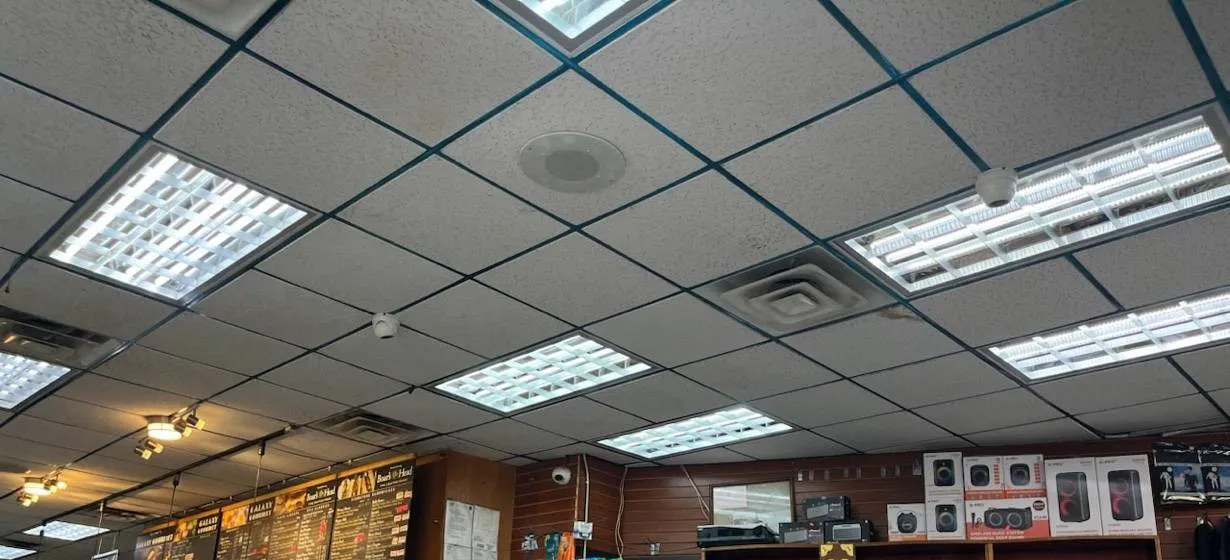
From our job library: small domes sit in the ceiling grid between the light panels of a deli and electronics counter, one over the shelving wall and one over the aisle. Domes this size are the most common indoor camera we sell for Manhattan stores.
Manhattan Camera Order or Quote
Tell us what you want to watch; we text back a 2K and a 4K option
✅
Request Sent!
Thanks. We will call or text with today's price and a delivery or install plan for your Manhattan address.
Equipment only, delivered to your Manhattan door, or installed by our own licensed crew
Every camera quote goes out as a 2K option and a 4K option
Licensed NYS low-voltage contractor, insured, 4.7 out of 5 from 201 Google reviews
The Store
A Manhattan Security Camera Store That Delivers, Installs and Answers the Phone
Most people who search for a security camera store in Manhattan end up with two choices: an online warehouse that ships a box and disappears, or an installer who only sells you a finished job. We sit between the two. Abstract Enterprises Security Systems stocks, programs and supports the cameras, recorders and accessories we sell, and you decide how much of the work you want from us. Buy security cameras equipment-only and we deliver them; buy them installed and our licensed crew mounts, wires and sets them up; or bring cameras you already own and we install those.
There is no pickup counter. That is a deliberate choice for an island where parking a car to collect a box can take longer than the drive itself. Instead, call or text and we'll deliver the order to your home or business in Manhattan, from Battery Park City to Marble Hill. We do not promise a delivery window or same-day drop-off; we confirm the timing by text when the order is placed, the same way we confirm install visits.
Being local matters most after the sale. A camera bought from a national site comes with a chat window. A camera bought from us comes with a phone number, (929) 560-0737, that reaches the people who sold it, and a crew that can come to the building if the app stops connecting or a drive fills up early. That support is the reason property managers, store owners and apartment residents buy from a licensed installer rather than from a search result.
What the numbers say about Manhattan right now
The NYPD divides Manhattan into two patrol boroughs, and both of their CompStat reports for the week of November 9–15, 2026 show crime falling this year, but at volumes that still keep cameras busy. Read the numbers as a reason to buy cameras that identify people clearly, not as a reason to buy as many as possible.
Burglary: 1,495 year to date below 59th Street and 1,236 above it, down 14.8% and 6.0%. In Manhattan North the week itself logged 36 burglaries against 18 in the same week last year.
Petit larceny, the category most package and lobby thefts fall into: 16,371 in Manhattan South and 11,674 in Manhattan North so far this year.
Grand larceny: 8,394 and 5,243 year to date, down 6.8% and 5.9%.
More than seventeen thousand retail theft complaints in one borough in ten and a half months is why a Manhattan store camera has to deliver a usable face at the door, and why a building's package room camera has to show the hands, not just the shelf.
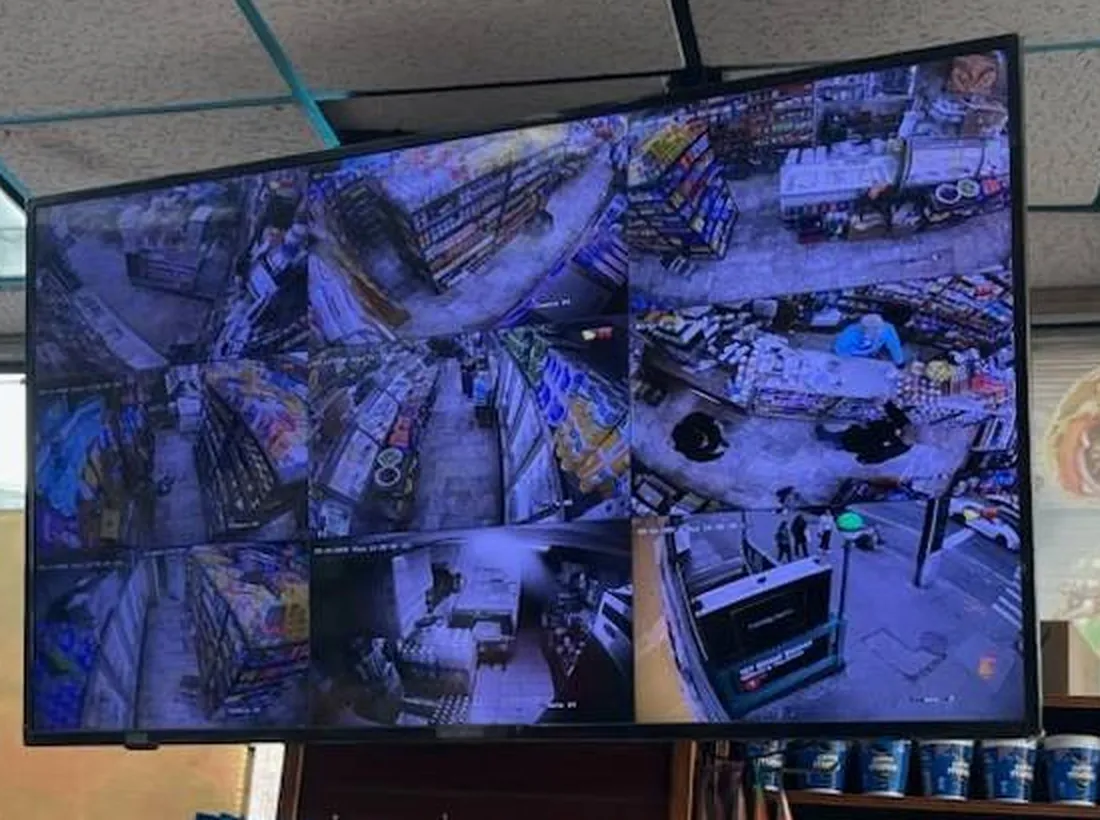
From our job library: a wall TV above the snack shelves shows every camera at once, including the sidewalk and the subway stairs outside. A display staff and customers can both see is one of the cheapest deterrents in a Manhattan store.
What we sell, in one list
Cameras: outdoor and indoor; 4K (8MP), 5MP and 2MP; dome, bullet, turret, eyeball, PTZ, fisheye, dual-lens and multi-sensor; PoE IP, HD-analog over coax, and a short list of WiFi models where cable is impossible.
Recorders: network video recorders (NVR) and digital video recorders (DVR) in 4, 8, 16, 32 and 64 channel sizes.
Storage: surveillance-rated hard drives sized to the number of days you want kept, from a 4TB drive in a small kit to 16TB and multi-drive recorders.
Network and power: PoE switches, PoE injectors, CCTV power supplies and adapters, battery backup.
Mounting and cable: wall, pole and corner brackets, camera junction boxes, Cat6 and outdoor-rated Ethernet, extension cable, BNC connectors, CCTV video baluns and replacement parts.
Every item on that list is call or text for today's price. Equipment costs move with supply, and we would rather quote you the real number this week than print one that is wrong next month.
Shop by Camera
Shop Security Cameras for Sale in Manhattan by Type and Place
Camera shopping goes faster when you start from the spot you want to watch rather than from a spec sheet. A lobby ceiling, a storefront awning, a hallway door and a rooftop bulkhead each want a different body, lens and mount. Below are the camera types we sell for Manhattan properties, what each one is good at, and where it tends to go wrong.
D
Dome security cameras
Low-profile, hard to knock out of aim, good for lobbies, store ceilings, offices and elevator landings. Vandal-resistant domes suit walk-up halls within reach. Call or text for today's price.
T
Turret and eyeball cameras
A ball in a cup with no glass bubble, so night infrared does not glare back. Our most-sold indoor and under-awning camera. Call or text for today's price.
B
Bullet security cameras
Long, narrow views: a service alley, a garage ramp, a corridor to a fire door. Visible on purpose, which is part of their job. Call or text for today's price.
P
PTZ and motorized zoom
Pan tilt zoom cameras for plazas, large retail floors and parking lots; motorized varifocal lenses when a fixed lens sees too much or too little. Call or text for today's price.
F
Fisheye and panoramic
One ceiling camera covering a whole small room, such as a mailroom, a pharmacy floor or a gym. Useful for overview, weak for faces. Call or text for today's price.
2
Dual-lens and multi-sensor
Two or more sensors in one housing to cover a corner or a long block front with one cable. Call or text for today's price.
!
Active deterrence cameras
Built-in siren, strobe and spotlight, sometimes two-way talk, for cellar hatches, back yards and closed storefronts. Call or text for today's price.
LP
License plate cameras
LPR and ANPR cameras for garage entrances and ramps where cars slow down. Sold and set up as an add-on. Call or text for today's price.
W
WiFi and wireless cameras
A short list for spots cable cannot reach, like a terrace or a rental where drilling is off limits. Call or text for today's price.
Outdoor surveillance cameras built for Manhattan winters
Outdoor cameras in Manhattan live hard lives. They sit under awnings that drip salt slush, on facades hit by wind funneling down the avenues, and on roof bulkheads that bake in July and freeze in January. The two ratings that matter on an outdoor camera are the ingress rating and the operating temperature range. IP66 means the housing is dust-tight and protected against powerful water jets; IP67 adds protection against temporary immersion. Several of our house-brand kits carry IP66 or IP67 ratings, and we list which on each package below. A camera without a stated rating stays indoors.
Weatherproof security cameras for winter also need heaters or a wide cold-rated range when they sit fully exposed, such as on a rooftop or a fire escape landing. Under an awning or a building overhang, a standard outdoor camera is usually fine. We look at the actual spot before recommending one over the other, because a rooftop camera that fogs every January morning is worse than no camera.
Indoor surveillance cameras for lobbies, halls and stores
Indoor cameras are where Manhattan buyers save money, because most indoor views do not need weather sealing or long infrared reach. A lobby, a hallway or a deli aisle is lit most of the day, and a 2MP or 5MP dome on a drop-tile ceiling will identify faces at the distances those spaces allow. Spend the money at the doors instead: the camera that faces the entrance has to handle bright daylight behind a dark figure, which is where wide dynamic range earns its keep.
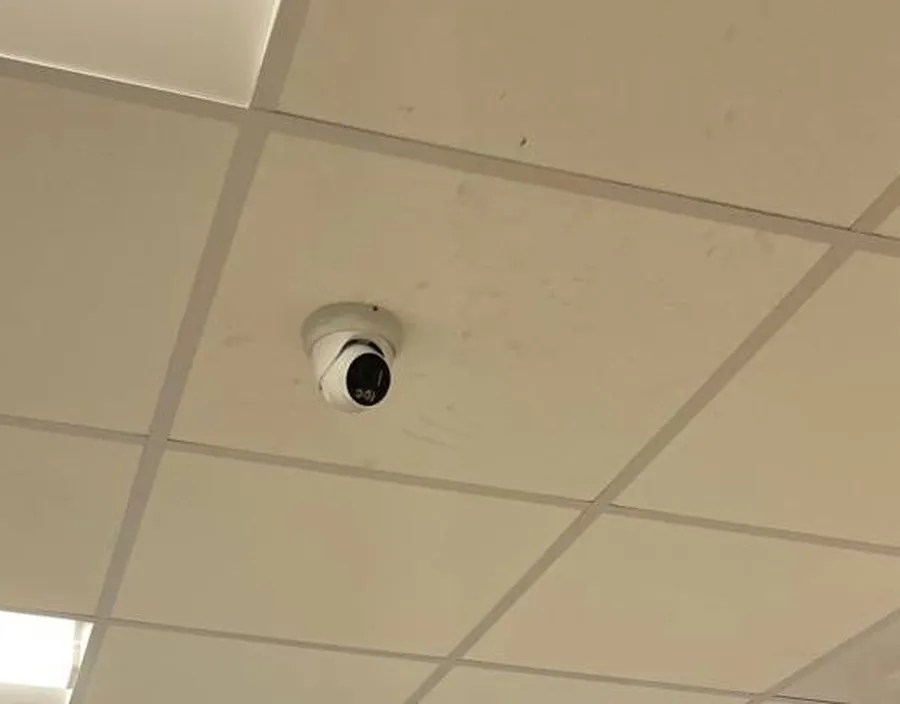
From our job library: a turret camera fixed to the middle of a ceiling tile. Turrets have no glass bubble, so the infrared at night does not reflect back into the lens, which is why we sell more of them than classic domes.
Hallway, stairwell and elevator cameras
Hallway security cameras in a Manhattan building usually go at the end of the corridor, aimed back toward the elevator or stair door, so they catch faces walking toward them. A camera over a door frame looking down the hall works too, as long as it does not see into any apartment when a door is open. Stairwell security cameras belong at landings where people enter and leave, not halfway up a flight. Elevator security cameras inside the car are a job for the building's elevator contractor and its inspector, so we supply the camera and recorder side and coordinate with them.
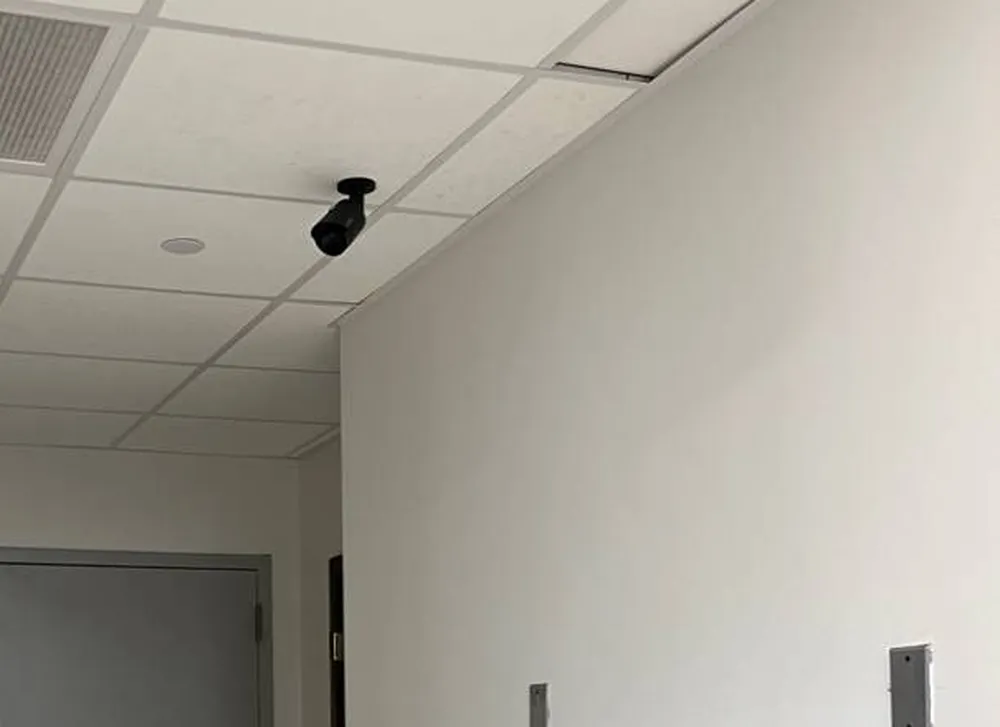
From our job library: a compact black bullet hung from the ceiling grid at the end of a corridor, aimed down the hall toward the door. The same position works on Manhattan apartment floors, office suites and back-of-house corridors.
Front door, package and lobby cameras
Front door security cameras and package theft prevention cameras are the most requested items on the island. In a doorman building the lobby camera should cover the desk, the street door and the package shelf behind the desk as three separate views; one wide lens across the lobby shows people as dots. In a walk-up, the vestibule between the street door and the inner door is the one place every person entering has to stand still, and a small dome there does more than any camera on the facade.
Doorbell security cameras are a separate decision. They are popular, but in a co-op or condo hallway they raise rules questions we cover in the apartment section below. For brownstones and townhouses with their own stoop, a doorbell camera at the door and a wired camera covering the stoop and areaway is the usual pair.
Rooftop, basement, garage and backyard cameras
Rooftop security cameras cover the bulkhead door, the roof hatch and the adjoining roofs on an attached row, which is how many walk-up break-ins begin. Basement security cameras watch the boiler room door, storage cages, the bike room and the sidewalk cellar hatch. Garage security cameras and parking garage security cameras cover the ramp, the pay station and the elevator lobby at garage level, where residents come and go without passing the doorman. Backyard and driveway security cameras matter mostly on townhouses, the few Manhattan houses with a garden, and the rear yards behind restaurants.
Resolution
4K, 5MP and 2MP Security Cameras: Matching Resolution to a Manhattan View
Resolution is the spec most buyers ask about first, and the one that is easiest to overspend on. Megapixels decide how much detail lands on a face or a hand at a given distance. They do not fix a camera aimed at a bright window, a lens that is too wide, or a recorder set to throw away detail to save space. That is why we send every Manhattan camera quote as two options, a 2K version and a 4K version, with the same camera positions, so you can see what the extra detail costs and decide for each view.
What you are comparing
2MP (1080p)
5MP (2K)
8MP (4K)
Pixels per frame
About 2 million
About 5 million
About 8 million
Face at a lobby door, 10–15 ft
✓ Usually
✓ Yes
✓ Yes
Face across a deep store or wide lobby
Often too small
✓ Usually
✓ Yes
Zooming into recorded video afterward
Limited
✓ Some
✓ Most
Storage used per day
Lowest
Middle
Highest
Good fit in Manhattan
Hallways, stairs, small rooms
Most doors, aisles, registers
Wide storefronts, lobbies, garages, sidewalks
When 4K security cameras are worth it
4K CCTV cameras earn their place on wide views where you may need to zoom in later: a storefront that faces both an avenue and a side street, a double-height lobby, a garage entrance, a long restaurant dining room. On a narrow walk-up hallway the extra pixels mostly show more wallpaper. Buying 8MP security cameras for every position also pushes up the recorder and drive size, because each 4K stream takes roughly twice the storage of a 2K stream at similar settings.
Night vision: infrared, color and starlight
Night vision security cameras use infrared LEDs to light the scene in black and white; the range quoted on our house-brand kits runs from 60 feet on the entry-level dome package to 120 feet on the 4K eyeball kits. Color night vision cameras, sometimes sold as full color or starlight cameras, use more sensitive sensors and, on our full-color packages, a dusk-to-dawn spotlight, so clothing and car colors stay visible after dark. Manhattan is rarely truly dark; street lighting means color night vision works on more facades here than in the suburbs, while infrared is still the better choice for a pitch-black cellar or bike room.
Low light, glare and backlit doors
Many lobby and storefront cameras in Manhattan face a glass door with daylight behind it. A camera without real wide dynamic range shows a silhouette. Low light security cameras and cameras with true WDR cost a little more and are the right purchase for those few positions; we flag them on the quote so you are not paying for the feature on every camera.
Kits
House-Brand Security Camera Kits Sold in Manhattan
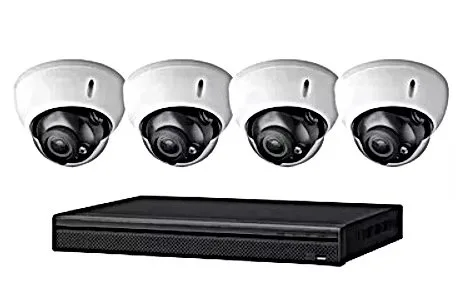
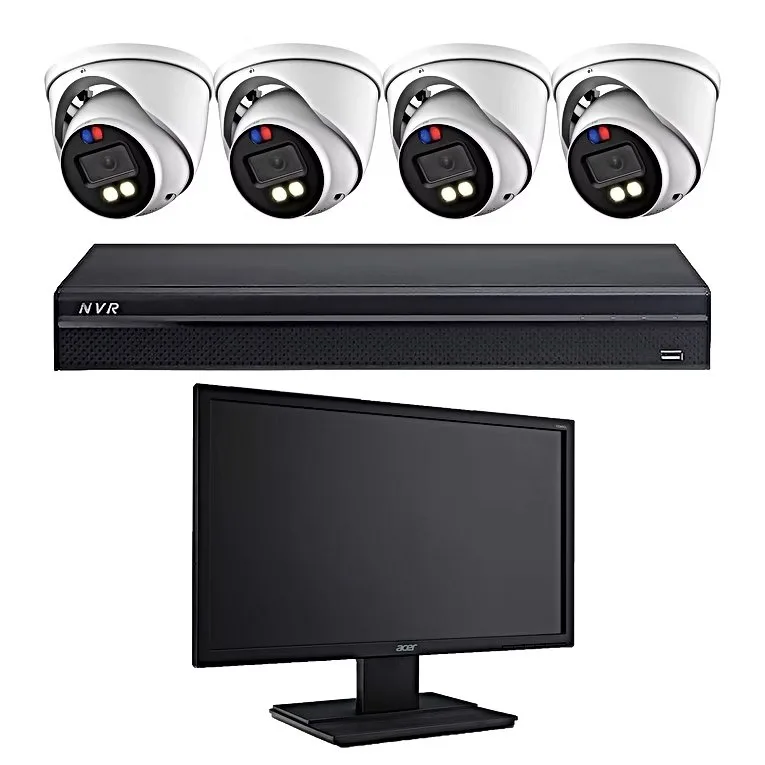
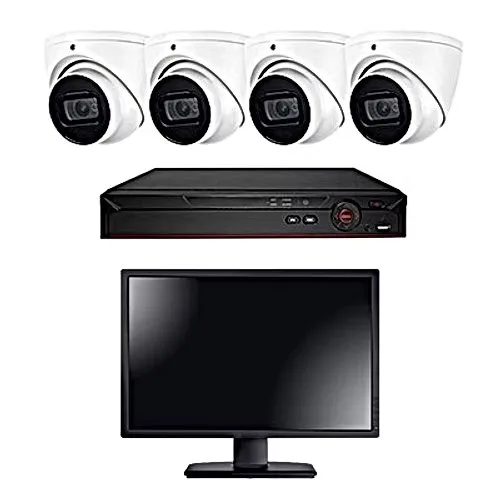
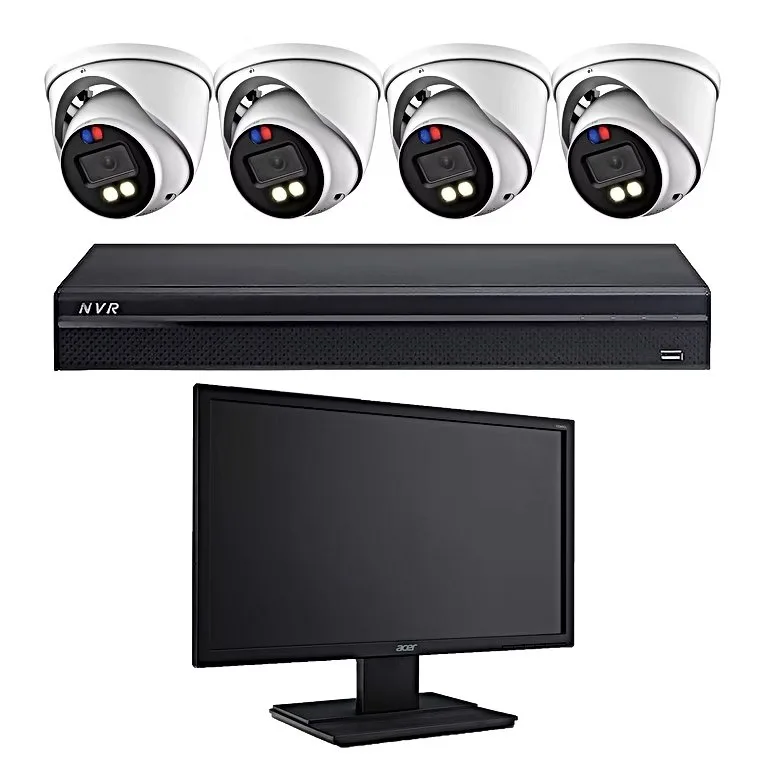
Our house brand is the default system on every quote. Each kit below is a complete four-camera security camera system with its recorder, and every one records locally with no monthly fee. The specifications come straight from our package listings; nothing is added. Buy any kit equipment-only for delivery, or installed, where the four-camera systems start at $1,099. For the equipment itself: call or text for today's price.
A4
Four domes, 2MP, 1080p DVR
Dome cameras with night vision up to 60 ft, built-in motion detection, wire runs up to 100 ft per camera, remote smartphone and PC access, 1080p DVR included. No audio. Call or text for today's price.
F6
Four eyeballs, 5MP, siren and strobe
Built-in alarm and siren, flashing lights, full color at night with audio, night vision up to 90 ft, IP67, 5MP DVR and a 20-inch monitor. Call or text for today's price.
C1
Four eyeballs, 8MP 4K, audio
4K eyeball cameras with built-in audio, night vision up to 120 ft, IP66 weatherproof, 4K DVR and monitor included. Call or text for today's price.
D4
Four eyeballs, 5MP IP, two-way talk
Smart AI human and vehicle detection, alarm and siren, flashing lights, two-way talk, full color at night with audio, night vision up to 90 ft, IP67, 4K NVR and a 20-inch monitor. Call or text for today's price.
House-brand package photo: the A4 kit, four 2MP domes on a 1080p DVR. It is the entry kit we suggest for hallways, stairwells and small stores where faces are close to the lens.House-brand package photo for the F6 deterrent kit. The same photo is used across our deterrent packages and its recorder is labeled NVR; the F6 package itself comes with a 5MP DVR and a 20-inch monitor, per its listing.
Which kit fits which Manhattan property
Studio or one-bedroom inside the apartment: one or two indoor cameras, often the smallest kit or a single camera added to a building's recorder with board approval.
Walk-up common areas: the A4 domes in the vestibule, hallways and cellar, with the recorder locked in a utility closet.
Doorman building lobby and package room: 5MP at the desk and package shelf, a 4K camera on a wide or double-height lobby.
Storefront or restaurant: the C1 4K eyeballs for the door and register line, plus the deterrent kit for a rear yard or cellar hatch.
Townhouse or brownstone: the D4 kit with two-way talk at the stoop and rear garden, so you can speak to a delivery rider from your phone.
House-brand package photo: the C1 kit, four 8MP 4K eyeball cameras with built-in audio, a 4K DVR and a monitor. Its IP66 housings suit awnings and storefront facades.House-brand package photo: the D4 kit, four 5MP IP eyeballs with human and vehicle detection, siren, flashing lights and two-way talk on a 4K NVR with a 20-inch monitor.
Name-brand cameras and our partners
Lorex, Luminys and Reolink are our partner brands, and we sell and install their systems in Manhattan alongside the house brand. As one example of what a name-brand kit includes, Reolink lists its RLK8-810B4-A as a 4K 8MP PoE system with four IP cameras, an 8-channel NVR and a 2TB hard drive expandable to 16TB, with person and vehicle detection (Reolink product page). Our Lorex camera installation in Manhattan page covers that line in more detail. We also sell, install and support other brands where a building already runs them, without claiming dealer status we do not hold. If you are weighing brands, start with our guide to the best security camera brands, then see the name-brand cameras we carry and the full lineup on our cameras page.
Recorders & Storage
NVR and DVR Recorders, Surveillance Hard Drives, PoE Switches and Accessories
The recorder is the part of a camera system you notice only when it fails, which is why we spend as much time choosing it as choosing the cameras. A network video recorder (NVR) records IP cameras over network cable; a digital video recorder (DVR) records HD-analog cameras over coax. Both store video on hard drives inside the box, both are reached from a phone app, and both keep recording when the internet goes down.
4
4 channel NVR and DVR
An apartment, a small shop or a townhouse front and back. Often built into our four-camera kits. Call or text for today's price.
8
8 channel NVR
A walk-up's common areas or a restaurant with room to add cameras later. The most common upgrade size. Call or text for today's price.
16
16 channel NVR
A mid-size co-op, a two-level store, an office floor. Usually needs two drive bays. Call or text for today's price.
32
32 channel NVR
Larger elevator buildings, hotels and garages; often paired with a separate PoE switch per floor or closet. Call or text for today's price.
64
64 channel NVR
Big residential complexes and multi-floor commercial buildings with a security desk. Call or text for today's price.
HD
Surveillance hard drives
4TB, 8TB and 16TB surveillance-rated drives built to write all day. Desktop drives are not a substitute. Call or text for today's price.
SW
PoE switches and injectors
One cable carries power and video to each IP camera. Switches sized to the closet; injectors for a single far camera. Call or text for today's price.
JB
Mounts and junction boxes
Wall, pole, corner and parapet brackets; junction boxes that hide connections behind the camera on stone and brick. Call or text for today's price.
C6
Cable, connectors and baluns
Cat6 and outdoor Ethernet, BNC connectors, extension cable, CCTV video baluns, power supplies and adapters. Call or text for today's price.
Choosing an NVR for a Manhattan building
Three numbers decide the recorder: how many cameras now, how many you might add, and how many days of video you must keep. Buy one size up on channels when there is any chance of adding cameras; a co-op that starts with eight cameras in the lobby and halls almost always adds the roof and cellar within two years. Then check that the recorder can decode the resolution you are buying on every channel at once, and that it has enough drive bays for the storage target. A PoE NVR with built-in ports is tidy for four to eight cameras in one closet; larger buildings do better with a separate PoE switch per riser closet feeding one recorder.
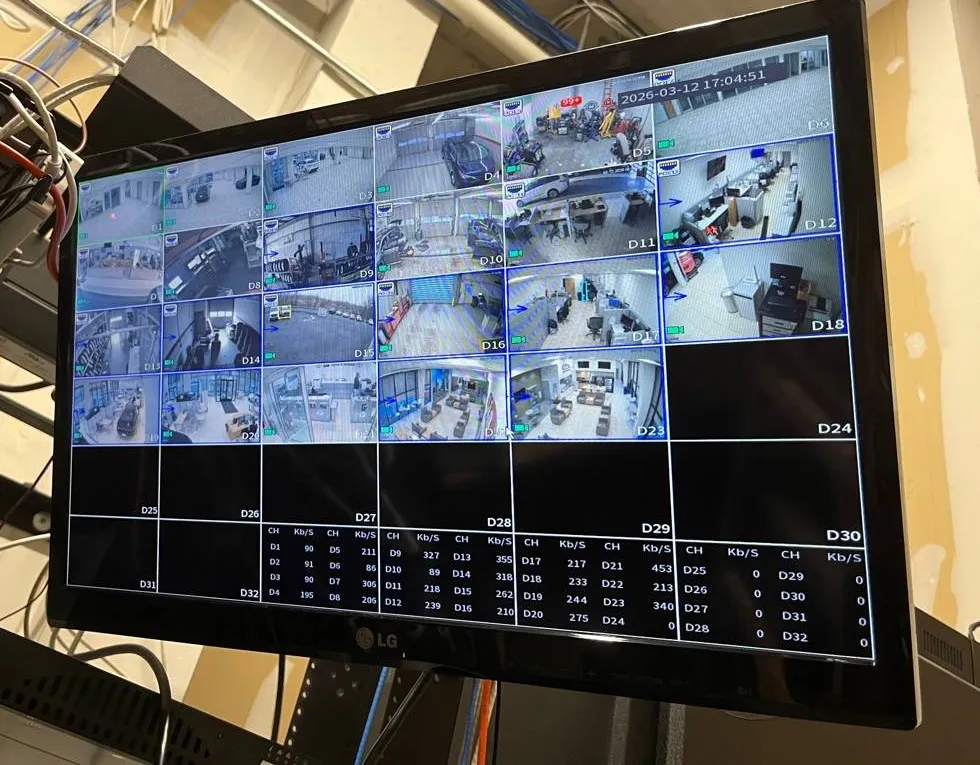
From our job library: a 32-channel recorder screen with about twenty cameras live and the bitrate of each channel listed underneath, from under 100 to over 450 Kb/s. Busy views use far more storage than quiet ones, which is why storage is sized per camera, not per system.
How to calculate CCTV storage: a worked estimate
Storage questions come up on almost every call, so here is the method we use, labeled clearly as an estimate. Real bitrates depend on the camera, compression (H.264, H.265 or H.265+), frame rate and how much moves in the scene, and they vary hour by hour, as the screen above shows.
Step 1, bitrate: take the camera's recording bitrate. For this example, assume a 4K camera recording continuously at 8 megabits per second.
Step 2, per hour: 8 Mb/s × 3,600 seconds = 28,800 megabits, divided by 8 = 3,600 megabytes, or about 3.6 GB per hour.
Step 3, per day: 3.6 GB × 24 hours = about 86 GB per camera per day.
Step 4, per retention period: 86 GB × 14 days = about 1.2 TB per camera for two weeks; × 30 days = about 2.6 TB for one month.
Step 5, whole system: four such cameras for two weeks = about 4.8 TB, so a 6TB or 8TB surveillance drive; for one month, about 10.4 TB, so 12TB to 16TB of storage.
Halve the bitrate for a 2K camera at similar settings and the numbers roughly halve. Motion-only recording, smart codecs and lower frame rates stretch it further, at the cost of gaps in the record. Security cameras with two weeks recording are the baseline we build to; security cameras with one month recording are common for co-ops and condos whose house rules set a retention period. If you want to try your own numbers, our camera system calculator walks through cameras, days and resolution.
Replacement parts and add-ons
Security camera replacement parts are a big share of what Manhattan buildings buy from us: a single dome to replace one that a contractor knocked off, a power supply for a DVR that died in a heat wave, a larger drive for a recorder that only keeps four days, a PoE switch for a closet that ran out of ports. Tell us the model printed on the old part, or text a photo of its label, and we match it. AI powered security cameras with person and vehicle detection can be added to many existing NVRs as long as the recorder supports the camera's analytics.
Comparisons
Security Camera Comparison: Wired, Wireless, PoE, WiFi, NVR, DVR, Cloud and Local
Most buying decisions come down to a handful of trade-offs. The tables below set them side by side with real characteristics, not marketing claims. A check mark means the option generally has that property; the right answer for your property still depends on the walls, the wiring and the rules of your building.
Wired vs wireless security cameras
Property
Wired (PoE or coax)
Wireless (WiFi)
Keeps recording when WiFi is congested
✓
No
Steady 4K video on every channel
✓
Depends on signal
No cable to run through walls
No
✓
Still needs power at the camera
No, power comes on the cable (PoE)
✓ Outlet or battery
Works through prewar plaster and brick walls
✓
Often weak
Easy to remove when a renter moves out
Takes patching
✓
Do security cameras need WiFi? Wired cameras do not. They record to the recorder over cable, and the internet is used only to view them remotely. In a Manhattan apartment building with dozens of WiFi networks on every floor, wired security cameras are the reliable choice; wireless cameras make sense where cable truly cannot go.
PoE vs WiFi security cameras
Property
PoE IP camera
WiFi camera
One cable for power and video
✓
No
Records without internet access
✓ To the NVR
Only models with an SD card or local hub
Cable run up to about 328 ft (100 m) per Ethernet standard
✓
Not applicable
Can be powered from a battery backup at the switch
✓
No, each camera needs its own
Quick to set up in a rental
No
✓
NVR vs DVR security cameras
Property
NVR (IP cameras)
DVR (HD-analog cameras)
Uses network cable (Cat6)
✓
No, uses coax
Reuses a building's existing coax
No
✓
Camera-side analytics such as person detection
✓ Widely available
On some models
Cameras powered over the video cable
✓ PoE
Separate power, or power-over-coax models
Records locally with no monthly fee
✓
✓
What Is the Difference Between CCTV and IP Cameras?
CCTV, closed-circuit television, is the older umbrella term for any private camera system that records to its own recorder rather than broadcasting. In everyday use it means analog or HD-analog cameras on coax feeding a DVR. IP cameras are digital network cameras: each one is a small computer that compresses its own video and sends it over network cable to an NVR. In practice the line has blurred, and many people say CCTV for both. For a Manhattan buyer the difference is mostly about the wiring already in the walls. A prewar co-op with coax running to every hall camera can upgrade to sharp HD-analog cameras on a new DVR without opening walls; a building that is rewiring anyway is better off with IP cameras and Cat6. Our CCTV installation in Manhattan page goes into the coax-reuse side in detail.
Property
IP cameras
Analog / HD-analog CCTV
Highest resolutions and multi-sensor options
✓
Up to 4K on current HD-analog
Each camera can be secured with its own password and firmware
✓
Not applicable, the DVR is the device
Lowest cost to upgrade on old coax
No
✓
Works with ONVIF and RTSP where the spec sheet says so
✓
No
Cloud vs local storage security cameras
Property
Local (NVR/DVR)
Cloud
No monthly fee
✓
Usually a subscription
Keeps recording during an internet outage
✓
No
Video survives if the recorder is stolen
No
✓
Weeks of 4K from many cameras
✓
Costly at that volume
Footage stays on your premises
✓
No
Our camera systems record locally with no monthly fee. Security cameras with cloud storage are an option only where the product actually offers it, and some buildings pair the two: local recording for everything, plus cloud clips of the front door. The simplest protection against a stolen recorder is putting it somewhere a thief will not find it quickly, such as a locked closet away from the lobby.
Apartments & Buildings
Apartment, Co-op and Condo Security Cameras in Manhattan
Most Manhattan camera buyers live in an apartment, and that shapes every choice. The first question is not which camera but whose wall it goes on. Inside your own unit you decide. In the hallway, the lobby, the roof and the cellar, the owner of the building decides: the landlord in a rental, the board in a co-op or condo, usually through its managing agent. Getting that right first saves buying a camera you are not allowed to mount.
What Security Cameras Are Best for Apartments?
For the inside of a Manhattan apartment, the best security cameras are small indoor cameras that record locally, view on a phone and come off the wall without damage when you move. A compact turret or dome on a shelf or a light-duty mount aimed at the apartment door covers the one entrance every apartment has. A second camera covering the main room catches what a door camera misses, such as a dog walker or a contractor wandering beyond the kitchen. Wired cameras are steadier, but in a rental the short cable run from a camera to a small recorder or a PoE switch is usually tucked along a baseboard rather than through the wall.
Owners of co-op and condo apartments have more freedom inside the unit and can wire properly during a renovation, when walls are open. That is the cheapest moment to run cable for cameras at the entry, a terrace door or a home office, and it avoids the stick-on look that renters live with.
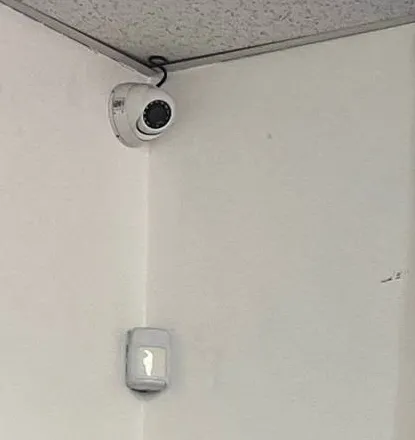
From our job library: an eyeball camera tucked into the top corner of a room, with an alarm motion sensor on the wall below. A corner position sees the whole room and the door from one spot, the same logic that works in a Manhattan apartment entry or a small office.
Renters: inside your apartment versus the common areas
A camera inside your own rented apartment, pointed at your own space, is generally your business; check your lease for rules about drilling and restore the walls when you leave. The common areas are different. Hallways, lobbies, roofs and cellars belong to the building, and a tenant who mounts a camera there without permission can be told to take it down. In a long-running r/nyc thread from a renter whose building had rampant package theft, the practical advice was to ask the landlord first, especially before drilling in the hallway (r/nyc). A peephole-style door camera that sees only the hall immediately outside your door is the usual compromise, and even that is something to clear with management in writing.
Renters also learn the hard way that a building's cameras are not their cameras. In one r/NYCapartments post, a tenant whose package was stolen from the lobby of a building they had just moved into was told the security camera system was down (r/NYCapartments). If the building's system is unreliable, the useful move is to ask management, in writing, to repair or replace it, and to offer a written plan they can approve.
Co-op and condo boards: who decides and what they ask
Boards make the rules for common areas. Brick Underground put the question of hallway doorbell cameras to attorney Niki Khindri of Adam Leitman Bailey P.C., who said, “In some circumstances it could be illegal for owners to have video doorbells recording footage in the hallway,” and the article notes a board can adopt a ban as a house rule; it also notes a camera should never point into a neighbor's apartment (Brick Underground, June 23, 2022). So before buying a doorbell camera for a co-op hallway, read the house rules or ask the managing agent.
For building-wide systems, boards usually ask three things: who can see the footage, how long it is kept, and whether any camera sees into a unit. FirstService Residential's guidance for New York condos and co-ops describes keeping footage for roughly 30 to 90 days, limiting access to the property manager or security provider with a log of requests, and placing hallway cameras so they never capture the inside of an apartment (FirstService Residential). We size recorders and set up viewer accounts to match whatever policy the board adopts.
Doorman lobbies and package rooms
Package theft is an everyday Manhattan problem. A Patch report from June 9, 2026, citing an analysis by Ecigone, estimated package theft losses in the New York area in the hundreds of millions of dollars across more than 6.3 million incidents, second only to Chicago among U.S. metros (Patch). The figure covers the metro area, not Manhattan alone, but anyone who has watched a lobby shelf fill up in December knows where much of it happens. Security cameras for holiday package theft work when they cover the package room door from inside, so faces show coming in, and the shelf itself from above, so hands show picking things up.
Prewar walk-ups and tenement buildings
Five- and six-story walk-ups on the Lower East Side, in the East Village, Hell's Kitchen, Harlem and Washington Heights have no doorman, a narrow vestibule, a single stair and often a roof door that is the weak point. The buying list is short: a vandal-resistant dome in the vestibule, one camera per hallway or every other floor, one at the roof door and one at the cellar or rear yard, all on a small recorder locked in a utility closet. Plaster on brick and tight stairwells make wiring slower, which is labor, not equipment; the cameras themselves are the same ones a modern building uses.
Brownstones and townhouses
Brownstone security cameras and townhouse security cameras on the Upper West Side, the Upper East Side, in Harlem and the West Village cover the stoop, the areaway below it, the garden or rear yard and sometimes the roof deck. Owners control the whole building, so the choices are about appearance: small white or black cameras matched to the facade, discreet mounts under the cornice or in the door surround, and cable run inside. Landmarked blocks need extra care with anything visible on the front.
Security cameras for landlords and property managers
Landlords and property management companies buy in bigger batches and care most about consistency: the same recorder brand, the same app and the same camera models across every building, so a super can look after any of them. Security cameras for property managers come with a written list of camera positions per address and one login structure across the portfolio. Multifamily security cameras for HOAs and residential complexes follow the same pattern on a larger scale.
Business Cameras
Business Security Cameras for Manhattan Stores, Restaurants, Offices and Hotels
Manhattan businesses buy cameras for three reasons: to stop loss, to settle disputes and to satisfy an insurer or landlord. Commercial grade security cameras are built for exactly that kind of daily use, with better sensors, metal housings, wider operating ranges and recorders designed to run all year without a reboot. The right mix depends on what you sell and where.
Which Security Cameras Are Best for Businesses?
For most Manhattan businesses the best camera setup is a wired system with an identification camera at every customer door, an overview camera on each aisle or dining area, a dedicated camera on each register or point of sale, and coverage of the back door, the stockroom and any cellar hatch. 4K is worth it at the front door of a wide store; 5MP handles aisles and registers; 2MP is fine for a stockroom. Commercial security cameras should record locally to an NVR in a locked spot, send alerts to the owner's phone after closing, and let a manager export a clip quickly when police or an insurer asks.
R
Retail and grocery stores
Door, aisles, high-value shelves, registers, stockroom. Security cameras for retail stores on 34th Street, Broadway or 125th Street face heavy foot traffic all day.
B
Delis and bodegas
Deli security cameras and bodega security cameras cover the counter, the cooler doors, the register and the sidewalk, plus a monitor customers can see.
F
Restaurants and bars
Restaurant security cameras watch the host stand, the bar, the cash register, the kitchen pass and the delivery door; bar security cameras focus on the door and the bar rail.
O
Offices and medical suites
Office security cameras cover the suite entry, reception, the IT closet and storage. Medical and dental office cameras stay out of exam rooms.
H
Hotels
Hotel security cameras cover entrances, lobby, front desk, elevator landings, luggage storage, back-of-house corridors and the loading area. Never guest rooms.
G
Gyms, salons and laundromats
Front desk and door, equipment floor or machines, and the cash point. Gym cameras stay out of locker rooms by law.
Retail corridors and storefronts
Manhattan's retail corridors each bring their own buying pattern. Along 34th Street and around Herald Square, high-volume stores need people-counting at the door and cameras at every register. On Canal Street and through Chinatown, narrow deep stores need a camera every few yards and a clear view of the cash counter. On Broadway in Washington Heights and Inwood, small groceries and pharmacies need the sidewalk in frame because that is where trouble starts. On Madison Avenue and in SoHo, boutiques want small, quiet cameras that do not spoil the look of the shop. Cash register security cameras and point of sale surveillance cameras belong over the counter, angled so the drawer and the customer's hands both show without recording PIN entry on the card terminal.
Restaurants, bars and kitchens
Restaurant kitchen security cameras help settle food-safety and workplace questions; dining room cameras settle walkout and slip-and-fall claims; bar cameras protect the till and watch the door after midnight. Video is the easy part. Audio is where owners get into trouble, which we cover under the law section below; our restaurant and bar systems are set up with audio off unless the owner has a lawful reason and posted notice.
Offices and office buildings
Security cameras for office buildings split along ownership lines. The landlord's base-building cameras cover the lobby, elevators, loading dock and garage. A tenant's cameras cover its own suite: the entry door, reception, the server or IT closet and any stockroom. Keeping the tenant's system separate from the landlord's network avoids arguments and lets the tenant leave with its equipment at lease end.
Hotels, garages and loading docks
Midtown and Financial District hotels, the garages under residential towers and the loading docks of office buildings tend to need 32- or 64-channel systems, several PoE switches in different closets, and a mix of PTZ cameras, license plate capture cameras at the ramp and wide 4K cameras over the lobby. Loading dock security cameras and logistics facility security cameras need low-light performance because docks are often dim. These are installed jobs more than equipment orders, and our security camera installation in Manhattan page describes how the crew handles them.
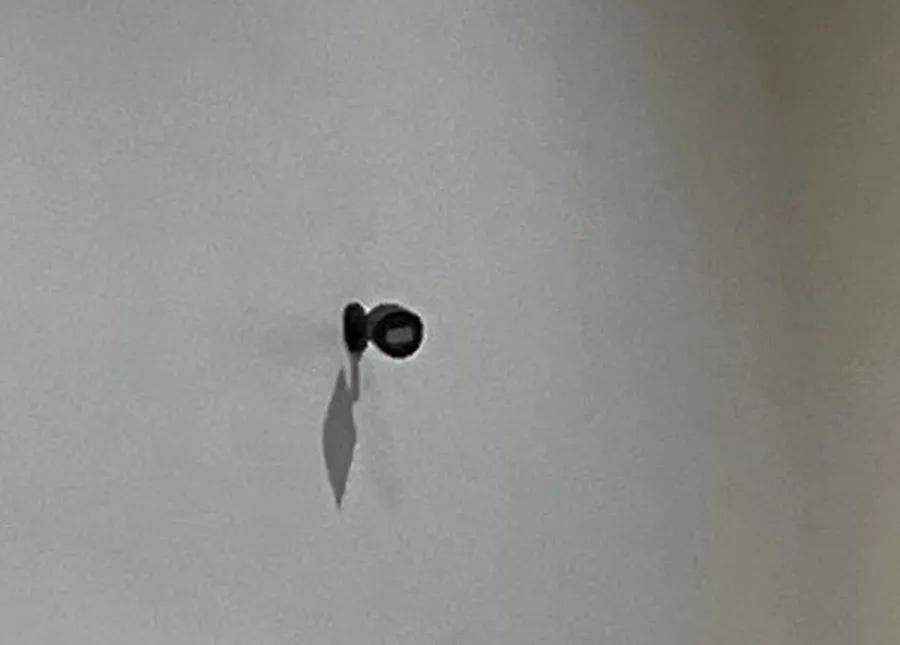
From our job library: a small black camera on a short stalk mount against a plain textured wall. Cameras this size suit Manhattan offices, boutiques and apartment entries where the owner wants coverage without a large housing on the wall.
Biometric signs for Manhattan stores, restaurants and venues
If a business uses cameras or software that identify people by their faces, New York City law applies. Under the city's biometric identifier information law, a commercial establishment, defined as a place of entertainment, a retail store or a food and drink establishment, that collects, retains, converts, stores or shares biometric identifier information must post a clear and conspicuous sign near all customer entrances explaining that in plain language, and it may not sell, lease or trade that information (NYC Administrative Code, Title 22, Chapter 12). Customers can sue for damages per violation, and a business usually gets 30 days' notice to fix a missing sign first (Troutman Pepper, June 25, 2021). Ordinary video that is not analyzed by identifying software and is shared only with law enforcement falls under an exception. Facial recognition security cameras are a product we will discuss, but the sign comes with them.
Field Notes
From Our Job Library: Reading a Store Ceiling Before You Buy
The photo at the top of this page comes from a deli and electronics counter in our job library, and it is a good lesson in buying cameras for a Manhattan storefront. Look at the ceiling: a drop-tile grid crowded with square light panels, a round speaker, air diffusers and track lights over the menu boards. Every one of those things competes with a camera for space, and two of them, the lights and the diffusers, actively hurt it. A camera right beside a light panel gets washed out; a camera in the airflow of a diffuser collects dust on its lens within months.
In the photo the domes sit in tiles between the panels, one toward the shelving wall and one over the center of the floor, clear of the light fixtures. Small domes suit a ceiling like that: they sit close to the tile, they do not snag on anything when tiles are lifted for maintenance, and they are hard to turn by hand. A bulky bullet in the same spot would stick down into the room and be the first thing a ladder hits.
The second photo on this page, the wall TV above the snack shelves, shows the other half of the job. The grid includes the aisles, the counter, a back room and the sidewalk with the subway stairs outside. A monitor customers can see tells them, before anyone says a word, that the cameras are real and recording. It is also a separate purchase decision, because it changes which recorder output, which cable and which wall mount the order needs, so we ask about it on every Manhattan store quote.
The quiet lesson from both photos: the cameras were not the expensive part of the decision. The placement was. A store that orders the right four cameras and mounts them in the wrong four places gets clear video of lights and ceiling tiles. That is why we ask for photos of the space, or visit, before we send the 2K and 4K options.
Rules
Security Camera Laws and Privacy Rules for Manhattan Buyers
Buying a camera is legal; where you point it and what it records are where the rules apply. Below are the sourced rules our Manhattan customers ask about most. This is general information, not legal advice; a building attorney or your own lawyer is the right person for your specific situation.
Audio recording. New York's eavesdropping law defines mechanical overhearing of a conversation as the intentional overhearing or recording of a conversation without the consent of at least one party, by a person not present (NYS Penal Law §250.00); §250.05 makes eavesdropping a crime. A camera microphone that records customers or neighbors talking when you are not part of the conversation is the risky case. Audio recording security cameras and two way audio security cameras leave us with audio recording turned off unless you ask otherwise.
Employees. New York Labor Law §203-c bars employers from video recording employees in restrooms, locker rooms and rooms designated for changing clothes, as FirstService Residential's guidance notes. That applies to staff areas in stores, restaurants, gyms, offices and residential buildings alike.
Biometrics. Retail stores, food and drink establishments and places of entertainment in New York City that collect biometric identifier information must post signs at customer entrances (NYC Administrative Code Title 22, Chapter 12, covered above).
Common areas. In co-ops and condos, the board's house rules govern cameras in hallways and lobbies, and boards can restrict video doorbells (Brick Underground, cited above).
Neighbors' windows. Whatever the rules, aim cameras at your own door, store or property, not into a neighbor's window or apartment. It is the simplest way to stay on the right side of both the law and the building.
CCTV regulations for businesses in Manhattan are mostly about these same points: no hidden recording where people expect privacy, no audio without care, signs where biometric tools are used, and footage handled by a small number of named people. A clear, visible camera with a posted notice is both the lawful choice and the better deterrent.
Cybersecurity & Phone Viewing
Cybersecure Cameras, Hacking Prevention and Viewing on Your Phone
Every network camera is a small computer on the internet, and in a city where a single apartment building can carry hundreds of connected devices, security cameras need the same care as a laptop. Most camera breaches are not clever. They come from default passwords, old firmware and recorders opened straight to the internet with a port forward.
How Do You Prevent Security Camera Hacking?
Change every default password on the recorder, every camera and the app, and use a different one for each viewer.
Give each person their own account with only the rights they need: live view for the doorman desk, playback for the managing agent, full control for the owner.
Keep firmware current on the recorder and cameras; we check and update it at installation and when a system is serviced.
Do not open ports on the router for remote viewing; use the manufacturer's encrypted app connection instead.
Put the cameras on their own network where possible, separate from the office or apartment WiFi, so a compromised laptop cannot reach the recorder and the other way round.
Turn on two-factor sign-in in the app where the brand supports it, and remove accounts when staff or residents leave.
Encrypted security cameras and cybersecure security cameras are worth buying, but only on the strength of what the spec sheet says, not the box. We point out which models document encrypted streams or encrypted cloud connections when we send the quote.
NDAA compliant security cameras
Section 889 of the 2019 National Defense Authorization Act, implemented in FAR 52.204-25, bars federal contractors from using video surveillance equipment produced by Hytera, Hikvision or Dahua, including their subsidiaries and affiliates (FAR 52.204-25). Private Manhattan buyers are not bound by that rule, but federal contractors, some institutions and some corporate offices are, and others simply prefer NDAA compliant CCTV systems. Compliance is a property of a specific model and its components, so we only call a product NDAA compliant when its manufacturer's spec sheet says so, and we will send that sheet with the quote.
Viewing security cameras on a phone
Every system we sell supports security cameras with smartphone viewing through the manufacturer's app. The recorder connects to your internet router; the app on your phone finds the recorder by scanning a code or signing into an account; you then see live view, play back recordings and get motion alerts. When we install, we set up the app on the phones you name and show each person how to find a clip and export it. When you buy equipment-only, setup instructions come with the recorder and we answer the phone if the app will not connect. Remote video surveillance on a phone needs internet at the building; recording does not.
Smart detection and analytics
AI security cameras with human and vehicle detection send fewer false alerts than plain motion detection, which matters on a Manhattan block where buses, cabs and pedestrians pass the camera all day. Smart search lets you ask the recorder for every person who passed the package room door between 2 and 4 p.m. instead of scrubbing through hours of video. Smart motion detection cameras, people counting cameras and object detection security cameras are all available on specific models; we only list the feature for a product when its spec sheet includes it.
Two Options, One Text Away
Tell us what you want to watch and where in Manhattan. We text back a 2K and a 4K option with today's price, for delivery or installation.
Where Generic Camera Buying Advice Misses in Manhattan
Most camera buying guides online, and most AI summaries built from them, are written for a detached house with a driveway and a yard. Manhattan has a few of those, but most buyers here live or work in something very different. These are the points where the generic advice most often steers Manhattan buyers wrong.
“Just buy wireless, it is easier”
Wireless is easier to mount and harder to live with in Manhattan. Prewar walls of plaster on brick, steel-framed floors and dozens of neighboring WiFi networks on the same channels all cut into signal. A wireless camera that streamed perfectly during setup can drop frames every evening when the building's residents come home and start streaming video themselves. Wired cameras avoid all of it. Wireless still has a place, on a terrace or in a rental where nothing can be drilled, but it is the exception, not the default.
“Battery cameras are fine outdoors”
Battery cameras sell well because they need no wiring. On a Manhattan rooftop, fire escape or rear yard in January, cold drains batteries faster, and a camera that has to be taken down and charged every few weeks tends to end up in a drawer. For any outdoor spot that has to work through the winter, a wired camera with power on the cable is the safer buy.
“The camera on the facade covers the lobby too”
A camera mounted outside, above a building's door, sees the tops of heads and the sidewalk. It rarely shows a face clearly, and it sees nothing once the person is inside. In Manhattan the most useful entrance camera is usually inside the vestibule or lobby, aimed back at the door at head height, where everyone entering has to face it and the light is controlled.
“A doorbell camera is a doorbell camera”
On a house, a doorbell camera is a simple purchase. On an apartment door in a co-op or condo hallway it can break the house rules, and on a rental door it needs the landlord's permission. Brownstone and townhouse owners have the freedom that the generic advice assumes; apartment residents usually do not, which is why we ask about the building before recommending one.
“Buy the system with the most cameras for the money”
Bundles with eight or sixteen cameras look like value until you check the recorder and the drive. A large bundle with a small drive keeps only a few days of video, and a camera count that does not match your actual doors and halls means some cameras end up watching nothing important. In a Manhattan store or building, fewer cameras in the right places, on a recorder with enough storage, beat a bigger box every time.
“The building's cameras will cover you”
Tenants of stores and offices often assume the landlord's cameras protect them. Base-building cameras cover the lobby and the building's doors, not the inside of your suite or the register in your shop, and getting footage from a landlord can take days. A tenant who needs evidence of what happens inside their own space needs their own cameras on their own recorder.
Buying Guide
Buying Security Cameras in Manhattan: Straight Answers
Who Sells Professional Security Cameras in Manhattan?
Professional security cameras are sold through three kinds of sellers: national online distributors, security integrators who sell only finished installations, and licensed installers who also sell equipment on its own. We are the third kind. Abstract Enterprises Security Systems is a licensed New York State low-voltage contractor, insured, and owner-operated since 2002. We sell professional grade security cameras, recorders and accessories equipment-only with delivery anywhere in Manhattan, or installed by our own crew. The difference from a box store is the support: the same people who sold the camera will program it, troubleshoot it and come to the building if needed.
Where Can I Get Affordable Security Cameras in Manhattan?
Affordable security cameras in Manhattan come from choosing the right resolution for each spot, not from buying the cheapest box. A 2MP dome in a hallway where faces are eight feet away costs less than a 4K camera and performs just as well there. Wired HD-analog cameras on a building's existing coax can cost far less to install than rewiring for IP. Our house-brand kits are the budget-friendly default, and every quote arrives as a 2K and a 4K option so you can mix them. Installed systems start at $1,099 for four cameras. For citywide budget guidance, see our page on affordable security cameras in New York.
How many cameras a Manhattan property usually needs
Count the doors first, then the paths between them. A one-bedroom apartment usually needs one or two cameras. A brownstone needs four to six: stoop, areaway, rear garden, roof, and one or two inside. A small walk-up needs one per entrance, one per hallway or alternate floor, plus the roof and cellar, which often lands at eight to twelve. A storefront needs one per door, one per register and one per aisle. A doorman co-op with a package room, garage and amenity spaces can need sixteen to thirty-two. People also ask how much an eight camera security system costs; the honest answer is that it depends on resolution, recorder and wiring, so we price the actual eight positions rather than a generic bundle, and the security camera pricing for Manhattan page shows the installed packages.
Choosing a security camera system in five decisions
Wired or wireless: wired wherever cable can reach.
IP on Cat6 or HD-analog on coax: IP for new wiring, HD-analog to reuse good existing coax.
Resolution per position: 2K for most, 4K for wide or important views.
Recorder size: channels for today plus growth, drive for two weeks or more.
Who views and how: phone apps, a public monitor, a desk screen, and the account rights for each person.
Buying locally versus online
You can buy security cameras locally in Manhattan from us or order online from a national store. Online wins on browsing; local wins on everything after the box arrives. A local seller can tell you which camera actually fits your vestibule, deliver to a building whose mailroom refuses large packages, set the recorder's clock so the evidence holds up, and answer the phone when the app breaks after a router change. When the order is installed, the system arrives working.
Season
Black Friday and Holiday Buying Notes for Manhattan
Black Friday falls on November 27, 2026, and Cyber Monday follows on November 30. Many people plan camera purchases around those dates, and that is reasonable, because December is when lobby package shelves overflow and stores are busiest. We are not running a Black Friday sale, a holiday discount or a limited-time offer, and we will not invent one. Our equipment is call or text for today's price every day of the year.
If you are shopping Black Friday security camera deals elsewhere, a few checks protect you. Look at the recorder's channel count and drive size, not just the camera count, because a bundle with a 1TB drive will keep only days of 4K video. Check whether the advertised low price assumes a cloud subscription. Check whether the cameras are wired or battery-powered, because battery cameras in a Manhattan winter need frequent charging. And check whether anyone local will install or support the system. If you buy elsewhere and want it installed, we install customer-supplied equipment too.
Installation visits in late November and December fill up the same way the stores do. We book within 2 hours and schedule seven days a week, including early-day visits, first come first served once paid. We never promise same-day installation, and during the holidays it is worth booking early.
Trade & Your Own Gear
Trade Orders, Bulk Buying and Cameras You Already Own
Installers, electricians, property managers and businesses buying in quantity can call or text for a trade quote. Tell us the models or the specs you need, the quantity and the Manhattan addresses, and we quote that order. We do not publish trade price lists or tiers; every bulk security camera order is quoted on its own. We act as a local security camera supplier and CCTV equipment supplier for that kind of buyer, with delivery to the job site or the management office.
If the cameras are already sitting in boxes in your back office, we install them. Customer-supplied equipment is labor only, quoted by phone or text once we know the models, the number of cameras and the building, and booked with the deposit like any other job. If something in the kit will not work well in your space, such as a WiFi camera headed for a basement, we say so before we start.
Before You Order
A Short Checklist Before Ordering Cameras for a Manhattan Address
The fastest orders are the ones where we know the space before we quote. Whether you want equipment delivered or a system installed, sending these details with your call, text or form means the 2K and 4K options fit the first time.
A photo of each spot you want covered, taken from where the camera would sit, plus one of the wall or ceiling surface. Drop tile, plaster, brick, stone and glass each need different mounts.
Rough distances: from each camera spot to the place the recorder will live, and from the camera to the farthest point you need to see clearly.
Where the recorder goes: a locked closet, an office shelf, a basement utility room. It needs a power outlet, ideally a battery backup, and a network cable to the router if you want phone viewing.
Existing wiring: old coax or network cable running to the camera spots, and the model of any recorder already there. A photo of the recorder's label is enough.
Building rules: for apartments and offices, any house rules, alteration agreement or landlord conditions about drilling, work hours and common areas.
Who will watch: the owner, a manager, a doorman desk, a super. Each one gets an account with the right permissions.
How long to keep video: two weeks, one month, or whatever your board or insurer requires. This decides the drive size more than anything else.
Delivery details: who can receive the order, whether a doorman desk accepts packages, and any loading or elevator restrictions.
If you are not sure about any of it, send what you have. We fill in the rest by text, or, for installed orders, on the visit. Buyers who just want a replacement camera or a bigger hard drive can usually skip the list and send a photo of the old part.
Package ideas by property type
Security camera packages make sense when they match a type of property. These are the starting points we use for Manhattan quotes, always adjusted to the actual doors and rooms. A studio or one-bedroom: one or two indoor cameras and a small recorder or SD-card camera. A brownstone or townhouse: four to six cameras covering the stoop, areaway, rear garden and roof, with two-way talk at the front. A walk-up's common areas: a vestibule dome, hallway cameras and roof and cellar cameras on an eight-channel recorder. A doorman co-op or condo: a lobby package of desk, door and package-room views, then hallways, elevator landings, garage and amenity spaces on a sixteen- or thirty-two-channel system. A deli, bodega or grocery: door, counter, register, aisles and sidewalk, plus a public monitor. A restaurant or bar: host stand, bar, register, kitchen pass, back door and dining room. An office suite: entry, reception, IT closet and storage. A pharmacy or medical office: entry, waiting room, dispensing counter and stock room, never exam rooms.
Get In Touch
Ask for Today's Price on Security Cameras in Manhattan
Tell us the cross streets, the kind of property and what you want to watch. We reply with a 2K and a 4K option, delivery or installation, or a trade quote. Prefer to talk? Call or text (929) 560-0737.
✅
Request Sent!
Got it. We will call or text with today's price and the next step for your Manhattan order.
How It Works
How Buying, Delivery and Installation Work
Eight steps cover every order, whether you want a single replacement dome delivered or a thirty-two camera system installed in a co-op.
1
Call, text or send the form
Tell us the address, the property type and the spots you want covered. Photos of each spot help.
2
Get a 2K and a 4K option
Same camera positions, two resolutions, with today's equipment price and, if wanted, the installed price.
3
Pick equipment-only or installed
Delivery only, full installation, or labor only for cameras you already own.
4
Confirm and pay
Equipment orders are confirmed with payment; installations with the deposit set out in the service agreement.
5
Delivery to your door
We deliver to your home or business in Manhattan and confirm timing by text; doorman buildings can receive for you.
6
Install visit booked
For installed orders we book within 2 hours, seven days a week with early-day visits, first come first served once paid.
7
Mount, wire and set up
Cameras mounted and aimed, recorder programmed, drive formatted, clock set, apps installed on your phones.
8
Handover and support
A short lesson on playback and export, a list of camera positions, and the same number to call afterward.
Warranty
Equipment bought without installation carries the manufacturer's warranty. Installed systems are covered by our terms. Full terms — including 50% deposit, one-year parts-only warranty on Abstract Enterprises Security Systems-supplied products, and the late-fee schedule — are set out in the service agreement.
What we will not do
We will not promise same-day installation, a delivery time window or free delivery, and we will not sell you a camera for a spot where it will not work. We will not mount a camera that records into a neighbor's apartment or a staff changing room. And we will not invent a sale to make you buy this week.
Where We Deliver
Camera Delivery Across Manhattan's Neighborhoods
We deliver and install across the whole borough, and the buildings change every few blocks. These are the patterns we see most in each part of the island.
FiDi
Financial District and Battery Park City
Office-to-residential conversions, hotels and towers with security desks; large NVRs and riser closets.
LES
Lower East Side, East Village, Chinatown
Tenement walk-ups, restaurants and narrow deep storefronts; vandal-resistant domes and compact recorders.
SoHo
SoHo, Tribeca, NoHo
Cast-iron lofts and boutiques that want small, discreet cameras and tidy cable.
MID
Midtown, Herald Square, Garment District
High-volume retail, showrooms, hotels and office floors; 4K at doors, many registers.
UES
Upper East and Upper West Sides
Doorman co-ops, condos, brownstones and Madison and Columbus Avenue shops.
UPT
Harlem, Washington Heights, Inwood
Prewar elevator buildings, walk-ups, 125th Street and Broadway groceries and pharmacies.
We also deliver to Chelsea, Hell's Kitchen, Murray Hill, Gramercy, Kips Bay, the West Village, Greenwich Village, Hudson Square, Morningside Heights, Hamilton Heights, East Harlem, Roosevelt Island and Marble Hill. Our Bronx office at 460 E Fordham Rd schedules every Manhattan order.
Price
What Moves the Price of Security Cameras in Manhattan
We do not print equipment prices on this page because supply prices move and a printed number goes stale. Installed four-camera systems in Manhattan start at $1,099, and the Manhattan pricing page linked in the buying guide above shows the full installed lineup. For equipment, these are the factors that move the number you will get when you call or text:
Resolution: 4K cameras and recorders that decode 4K on every channel cost more than 2K.
Camera count and recorder channels: an 8-camera system needs an 8- or 16-channel recorder and a bigger switch.
Storage days: one month of recording can need two to three times the drive of two weeks.
Wiring type: PoE IP cameras need a switch or PoE recorder; HD-analog reuses coax with a DVR.
Features: active deterrence, two-way talk, PTZ, license plate capture, varifocal lenses and analytics add cost per camera.
Housing: outdoor, IP67, vandal-resistant and IK-rated housings cost more than indoor plastic.
Security camera system cost in a Manhattan building also depends on labor: riser runs, plaster and stone, building work hours and approvals. Those are installation factors, quoted separately, and none of them apply when you buy equipment-only for delivery.
Describe the property and get a written plan back.
FAQ
Security Cameras in Manhattan: FAQ
What security camera system should I buy for my Manhattan apartment?
+
For inside one apartment, buy one or two small indoor cameras that record locally and view on your phone: one aimed at the apartment door and one covering the main room. Owners renovating can wire them properly; renters usually choose cameras that come off the wall cleanly. If you also want the hallway or lobby covered, that is the building's decision, so ask the landlord or managing agent first. We send a 2K and a 4K option either way.
How do I view my security cameras on a phone?
+
Install the recorder or camera maker's app, connect the recorder to your internet router, and add it to the app by scanning its code or signing in to the account. You then get live view, playback and motion alerts. Recording does not need internet; remote viewing does. When we install, we set the app up on the phones you name; when you buy equipment-only, we answer the phone if it will not connect.
Can a Manhattan renter put a camera inside the apartment without asking the landlord?
+
A camera inside your own rented apartment, aimed at your own space, is generally your business, but check the lease for rules on drilling and alterations and repair any holes when you move out. Hallways, lobbies, roofs and cellars belong to the building, so cameras there need the landlord's permission. This is general information, not legal advice.
Can I mount a camera or video doorbell outside my apartment door in a co-op or condo hallway?
+
Only if the building allows it. The hallway is a common area governed by the board's house rules, and Brick Underground reported in June 2022 that a co-op board can adopt a ban on video doorbells as a house rule. Ask the managing agent in writing before buying, and never aim a camera into a neighbor's apartment.
Does a Manhattan store or restaurant need a sign if its cameras use face recognition?
+
Yes. Under NYC Administrative Code Title 22, Chapter 12, retail stores, food and drink establishments and places of entertainment that collect or store biometric identifier information, such as face geometry, must post a clear and conspicuous plain-language sign near every customer entrance, and they may not sell or trade that data. Ordinary video that is not analyzed by identifying software falls under an exception.
Will you deliver to a doorman building if nobody is home to sign?
+
Yes. Doorman and concierge buildings can receive the delivery for you if the desk accepts packages for residents. Walk-ups and offices need someone at the address, and we confirm the timing by text when the order is placed. We do not offer a pickup counter, and we do not promise same-day or timed delivery.
Can a managing agent order cameras for several Manhattan buildings on a trade quote?
+
Yes. Property managers, installers and businesses buying in quantity call or text for a trade quote with the models or specs, quantities and addresses. Each order is quoted on its own; we do not publish trade price lists or tiers. We can deliver to each building or to the management office.
Will new cameras work on the old coax in a prewar Manhattan co-op?
+
Often, yes. If the coax tests clean, HD-analog cameras on a new DVR can reuse it and give far sharper video than the old analog cameras, without opening plaster walls. Coax that fails the test, or a building that wants IP features, is a case for new Cat6 and an NVR. We test before recommending either.
Can cameras record audio at a Manhattan bar or restaurant counter?
+
Be careful. New York Penal Law section 250.00 defines mechanical overhearing as recording a conversation without the consent of at least one party by someone not present, and eavesdropping is a crime under section 250.05. Recording customers talking at a bar is the risky case. Our systems are set up with audio recording off unless the owner has a lawful reason, posted notice and, ideally, advice from a lawyer.
How long should a Manhattan co-op or condo keep lobby footage?
+
The board sets the policy. FirstService Residential's guidance for New York condos and co-ops describes keeping footage roughly 30 to 90 days, depending on building size and storage, and deleting it securely afterward. Two weeks is the minimum we build to; one month or more is common for lobbies, and the hard drive is sized to whatever the board chooses.
Are the cameras you sell NDAA compliant?
+
Some are and some are not, because compliance belongs to a specific model and its parts. Section 889 of the 2019 NDAA, applied through FAR 52.204-25, bars federal contractors from video surveillance equipment made by Hytera, Hikvision or Dahua. We only call a product NDAA compliant when its manufacturer's spec sheet says so, and we send that sheet with the quote.
Is Black Friday a good time to buy security cameras in Manhattan?
+
It is a fine time to plan, especially before December package deliveries peak, but we do not run Black Friday sales or holiday discounts, and every item is call or text for today's price. If you compare deals elsewhere, check the recorder's drive size, whether a subscription is required and whether anyone local will support the system.
What warranty comes with cameras bought without installation?
+
Equipment bought without installation carries the manufacturer's warranty. Installed systems are covered under our service agreement, which sets out the one-year parts-only warranty on products we supply. Either way, call or text (929) 560-0737 and we help sort out a failed camera or recorder.