Offline · Won’t Connect · No Video · Login & Playback Issues — Support & Repair Across Brooklyn
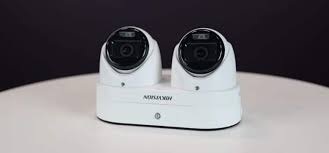
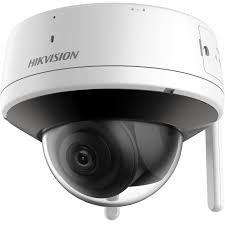
Guarding Vision support, repair, and troubleshooting across Brooklyn — every neighborhood from Bay Ridge and Park Slope to Williamsburg, Bed-Stuy, and Canarsie. If your Guarding Vision app shows “device offline,” won’t connect, won’t play live view or playback, drops push notifications, or you’re locked out, we fix it. First thing to know: Guarding Vision is an app, not a camera brand. It’s the OEM version of Hikvision’s viewing app, so your cameras and recorder are almost certainly Hikvision (or a Hikvision OEM) — well-documented, widely supported, and very repairable. We service the app, the NVR/DVR, the network, and the cameras — including systems someone else installed.
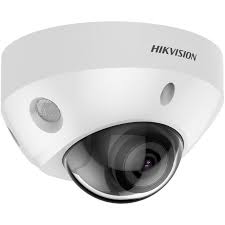
Guarding Vision is the free mobile app used to view certain security cameras remotely on a phone or tablet — it is not a camera brand. It’s the OEM (dealer-branded) version of Hik-Connect, Hikvision’s own viewing app, so if you log in with Guarding Vision your cameras and recorder are almost always Hikvision or a Hikvision OEM unit sold under a dealer’s label. The two apps run on the same P2P cloud platform and behave almost identically.
That’s good news when something breaks. Hikvision hardware is well-documented, widely supported, and very fixable, so most Guarding Vision problems — device offline, can’t connect, no video, login trouble — have a clear cause and a clear fix. Below we walk through every common issue by symptom, exactly the way you’d search for it, so you can see what’s wrong and what it takes to fix it.
Tell us what the app shows and where you are — we diagnose the recorder, network, cameras, and Guarding Vision setup across Brooklyn. Most issues fixed in one visit; some remotely. Including systems another company installed.


Send a photo of your recorder and the app error — we’ll tell you the fix before anyone comes out.
Guarding Vision and Hik-Connect are two names for nearly the same thing. Hik-Connect is Hikvision’s own consumer app; Guarding Vision is the OEM/dealer-branded version, distributed by resellers who sell Hikvision hardware under their own name. Same underlying platform, same P2P cloud, near-identical screens, same fixes. If you searched “Hikvision app not working” or “Hikvision remote viewing app problems” and landed here, you’re in the right place.
Whichever app you use, you have Hikvision-family hardware — which is exactly why it’s so repairable. If you’re also thinking about upgrading or expanding, see our Hikvision camera installation service; we can often reuse your existing cameras and cabling with a new recorder, and we cover Hikvision across Brooklyn, Queens, Manhattan, the Bronx, and the whole city.
Searching “who fixes Guarding Vision camera systems” or “Guarding Vision repair company near me” turns up a lot of national call centers and lead brokers. We’re a licensed New York low-voltage contractor serving Brooklyn (NYS #12000287431) that does the work ourselves — the same technicians who install Hikvision systems repair Guarding Vision setups every week.
NYS #12000287431 — a real local contractor, not a call center or lead broker.
Hikvision and OEM hardware is our daily work — app, recorder, network, and cameras.
Most repairs we do are on systems set up by another company or a previous owner.
Tell us the symptom or send a photo — we’ll give a likely cause and price before anyone comes out.
Every Brooklyn neighborhood, from the waterfront to East New York.
If a repair isn’t worth it, we’ll tell you — and an upgrade often reuses your cameras.
Search a Guarding Vision error and you’ll get forum threads, generic “restart the app” advice, and lead-broker sites. Here’s the straight version.
Most Guarding Vision problems aren’t the app at all — they’re the recorder’s connection to the internet, a changed password, failed storage, or old firmware. Reinstalling the app does nothing for those. The fix is diagnosing the recorder, network, and cameras, which is why generic app advice so often fails.
Because Guarding Vision is an OEM app, owners often don’t realize they have Hikvision hardware — so they search for “Guarding Vision” help and never find the wealth of Hikvision documentation and support that actually applies. Knowing it’s Hikvision underneath is half the battle, and it’s why these systems are so fixable.
If a recorder is many years old on firmware that’s no longer maintained, endless troubleshooting wastes money. A modern Hikvision NVR usually reuses your existing cameras and cabling, restores reliable remote viewing, and costs far less than a full new system. We’ll always diagnose first and tell you which it is.
“Nine out of ten ‘Guarding Vision is down’ calls are the same story — customer got new internet, the installer used the old router’s settings, and the recorder never reconnected. People think the cameras died. They didn’t. The recorder just lost its path to the cloud. Twenty minutes and it’s back.”
“The other big one is password lockout — previous owner set it up, or someone forgot it after years. Because it’s Hikvision underneath, there’s a real recovery path; we don’t have to wipe everything. And firmware: a system that worked for five years suddenly won’t connect because the cloud moved on. Update the firmware, it’s back. That’s the stuff ‘reinstall the app’ never fixes.”
— Field tech, Abstract Enterprises · 25+ years on Hikvision & OEM systems
Tell us the symptom and your area — we’ll call with a likely cause and price.
“Guarding Vision said device offline for two weeks after I switched internet providers in Flatbush. They fixed it in one visit — turned out the recorder just needed reconnecting to the new router. Cameras were fine the whole time.”
— Homeowner, Bay Ridge
“Bought a house with cameras already installed, no password, couldn’t get into Guarding Vision. They recovered it, re-registered everything under my account, and showed me how to use the app. Didn’t have to replace a thing.”
— Brownstone owner, Park Slope
“App couldn’t play back recordings. They found a dead hard drive in the recorder, replaced it, and now playback works perfectly from my phone. Honest and fast.”
— Business owner, Williamsburg
Transparent ranges. We diagnose by phone first and give you a likely number before any visit.
Re-adding a device, app guidance, simple account help — sometimes resolved on the call.
On-site diagnosis of offline, no-video, or login issues, with the fix often included for app/network problems.
Hard drive replacement, a failed camera, cabling, or a recorder upgrade — quoted after diagnosis.
Tell us the problem. We’ll call you back within the hour — no obligation.
Whatever you need for your Guarding Vision system in Brooklyn, we handle it — from a quick app fix to a full recorder upgrade:
Guarding Vision support · technical support · camera support · security camera support · troubleshooting · system repair · camera repair · app repair · expert technician service
Guarding Vision setup · initial setup · system setup · camera setup · mobile app setup · app configuration · network configuration · remote access setup · camera access · P2P setup · Android app support · iPhone app support
Guarding Vision NVR support · DVR support · NVR repair · DVR repair · recorder repair · NVR not recording · DVR not recording · firmware update · firmware upgrade · camera upgrade · system upgrade · Hikvision camera app problems
Offline, won’t connect, no live view or playback, login locked, notifications dead, or setup help — we support and repair Guarding Vision and the Hikvision hardware behind it across Brooklyn. Licensed, insured, honest when it’s an upgrade instead of a repair.
Freshness: Updated May 2026 · NYS Lic #12000287431 · Guarding Vision is a Hikvision OEM app · Hik-Connect · Hikvision cameras